
How the CMYK Color Bar Keeps Your Prints Color Accurate


That strip of colored squares in the edge of a press sheet is a measuring instrument. The CMYK color bar checks ink density and registration, the press operator reads it every few sheets, and that is why your color arrives exactly as approved.
A CMYK color bar is a strip of ink patches printed in the trim edge of a press sheet so the operator can measure and hold color. It carries solid cyan, magenta, yellow, and black patches, tint steps, a gray balance patch, and registration targets. A densitometer reads them across the run, ink is adjusted to target, and the strip is trimmed away before your pieces ship. You never add it yourself.

Start here
A measuring instrument on the sheet edge
The CMYK color bar is a press instrument, not part of your design. It is a strip of ink patches, solid CMYK, tint steps, gray balance, and registration targets, printed in the trim edge of the press sheet. The operator measures it with a densitometer and adjusts ink until every value hits target, then the strip is cut away. The blueprint below maps exactly what each patch on the strip is checking.
What the CMYK color bar on a press sheet is

If you have ever seen a printed proof with a strip of little colored squares running along one edge, you have met the color bar. It is a row of ink patches, usually solid cyan, magenta, yellow, and black plus a handful of tints and targets, printed in the waste area of the press sheet just outside your artwork. It looks like decoration. It is actually a measuring instrument.
The color bar, sometimes called a color calibration bar or a press color bar, exists so a press operator can check color with a number instead of an opinion. A screen glows in red, green, and blue light, while a press lays down cyan, magenta, yellow, and black ink, so the only reliable way to know the ink is correct is to measure it. The bar gives the operator patches to measure. When you print full-color pieces like brochures, flyers, or posters, that strip is quietly doing the quality control on every sheet.
One thing to settle early: the bar is never part of your design and you never add it. It lives in the trim, does its job during the run, and is cut away before your finished pieces ship. For the color theory that sits underneath it, pair this page with our guide on why printing uses CMYK.
What each patch on the color bar measures

Every patch on the bar answers a specific question about the ink. The four solid patches check density: is each ink laying down at full, correct strength, or has one gone light or heavy? Next to them, tint steps at 25, 50, and 75 percent check dot gain, the small growth of halftone dots as wet ink meets paper. Too much dot gain and midtones turn muddy, so the operator watches these closely.
A gray balance patch is built to look perfectly neutral. If it picks up a warm or cool cast, the operator knows the color is drifting even before it shows in a photo. Registration targets, those little crosshair rings, confirm all four plates are lining up. When they do not, edges print fuzzy and you get thin color halos around type. A slur bar catches mechanical smearing or a doubled impression.
Read together, these patches turn a subjective judgment into a set of readings the operator can correct against. If you want to see exactly how these marks sit on a real sheet, the blueprint below maps the whole strip.
How the color bar keeps your color accurate across the run

Printing thousands of identical pieces is not automatic. Ink behaves like a living thing on a press: temperature, paper, and roller pressure all nudge it, and over a long run color can slowly drift. The color bar is how that drift gets caught and corrected before it ever reaches your artwork.
Here is the loop in practice. The operator pulls a sheet and measures the bar patches with a densitometer, a device that reads exactly how much light each patch reflects and reports a density number. Those numbers are compared to the target for the job. If cyan reads heavy or the gray patch shows a cast, the operator turns the ink keys down or up until the readings return to target, then measures again. Repeated across the run, this keeps piece 5,000 matching piece 1.
This is also why building your file correctly matters so much: the cleaner your CMYK file, the easier the bar has it holding your intended color. Get your file right first with our RGB to CMYK conversion steps, and use our free online file check when you order so nothing off-color slips onto the plates.
What color control means for your order

For you, the takeaway is simple: the color bar is one reason you can order full-color printing and trust that what you approved is what arrives, at fifty pieces or five thousand. You do not manage it, place it, or pay extra for it. You just get the benefit of it on every job that runs through the press. It is also the reason a reprint months later can still sit next to the first batch on a table without looking like a different brand, because both runs were held to the same numbers on the same marks.
Your part is the file. Design in CMYK so your preview reflects process ink, place images at 300 DPI at final size, and add bleed past the trim. Convert bright RGB blues, oranges and greens yourself rather than leaving them for the press, so you see the CMYK version before you approve it, and set small text and thin rules in black alone instead of a four-ink build, which keeps them crisp no matter how the registration targets read. If a precise brand color is critical, order a printed proof or free paper samples so you can judge the ink on the actual stock before a full run. That combination, a clean file plus press-side color control, is what removes the guesswork from color.
Ready to put it to work? Start a full color brochure printing job in the configurator, or browse full-color brochures, business cards, and posters below, set your size and stock in the configurator, and let the press color bar hold your color from the first sheet to the last.
Wally reads the bar so you do not have to
The color you approve is the color that ships
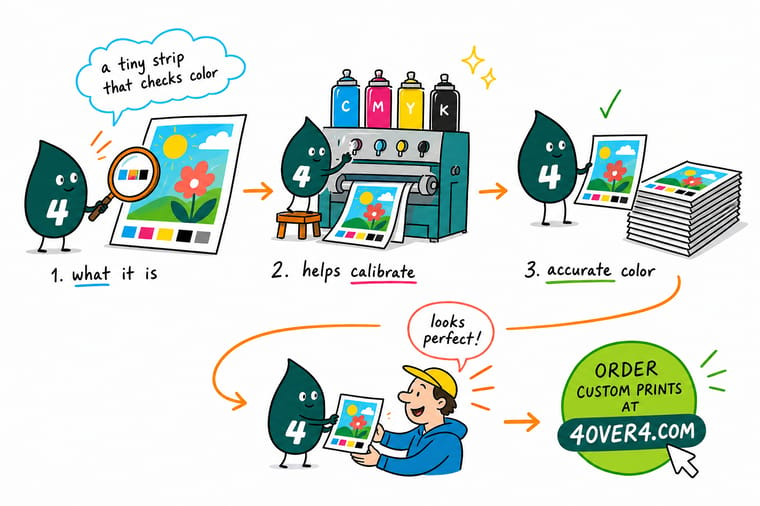
Wally treats the color bar like a dashboard: solid CMYK on target, tints holding, gray staying neutral, plates lined up. The press operator reads those patches across the whole run and nudges ink before any drift reaches your art. Your job is just the file, built in CMYK. Do that, and 4OVER4 handles the rest so every piece matches the one before it.
Print color-accurate brochures →Quick reference
What each mark on the color bar tells the operator
Every patch answers one question about the ink. Match a mark to its job and the strip stops looking like decoration and starts reading like the instrument panel it is.
| Mark on the bar | Held to | What it protects |
|---|---|---|
| Solid CMYK patches | Density on target | Full-strength cyan, magenta, yellow, and black tell the operator each ink is laying down at the right weight, not too light or too heavy. |
| Tint steps (25/50/75%) | Dot gain in range | Halftone dots grow slightly as ink hits paper. These steps reveal how much, so midtones do not print muddy. |
| Gray balance patch | Neutral, no cast | A patch built to look neutral gray exposes any color shift, so photos and skin tones stay believable. |
| Registration target | Plates aligned | Crosshair rings show whether all four ink plates line up. Misregistration prints as fuzzy edges or color halos. |
| Slur and doubling bar | No smear | A fine pattern catches mechanical smearing or a ghosted second impression before it reaches your art. |
| Solid black density | Even across the run | Large blacks are the first place drift shows. Holding this patch keeps every sheet in the run matching. |
On the sheet
What a CMYK color bar looks like on a press sheet
Look along the trim edge of a fresh press sheet and you will find a thin strip of small squares, usually well under a quarter inch tall, running the full width of the sheet outside the live artwork. That is the color bar. The same block of marks repeats across the sheet, left edge to right edge, so the operator can read ink at the gripper edge, in the middle and on the far side instead of measuring one spot and hoping the rest of the sheet matches it.
Read the strip left to right and it is the same short sequence over and over: four solid ink patches, a run of tint steps, a gray balance patch, the two-ink overprints, then registration and slur targets. The table below is the working version of that strip, mark by mark: what each one measures, what the operator wants the number to say, and what it does to your job when the reading drifts.
| Mark on the sheet | What it measures | What the operator wants | What a bad reading does to your job |
|---|---|---|---|
| Solid cyan, magenta, yellow and black patches | Solid ink density, meaning how thick a film of each ink the press is laying down. | Every ink sitting on the density target the shop runs for that stock, checked across the width of the sheet. | Heavy cyan plugs the shadows and pulls neutrals blue. Light black leaves photos and type looking washed out and flat. |
| Tint steps, commonly 25, 50 and 75 percent | Dot gain, how much each halftone dot spreads as the ink meets the paper. | Printed tints reading close to the values in your file, inside the tolerance for that press and stock. | A 50 percent patch reading far darker means skin tones, skies and pale backgrounds go muddy and lose their detail. |
| Gray balance patch, cyan plus magenta plus yellow | Whether the three chromatic inks are combining into a genuinely neutral gray. | A patch that reads neutral, with no warm or cool cast in it. | A cast here shows up in every neutral in the job: gray suits, concrete, white shirts, product shadows. |
| Two-ink overprints, the red, green and blue blocks | Ink trapping, how cleanly the second wet ink accepts onto the first. | Clean, saturated secondaries where two solids overlap. | Weak trapping dulls the reds and greens inside photographs even when each single ink measures perfectly on its own. |
| Registration targets, the crosshair and star marks | Plate to plate alignment across all four printing units. | All four inks landing inside one crosshair with no colored fringe on the edges. | Misregistration puts a colored halo on type, doubles hairline rules and softens small reversed text. |
| Slur and doubling bar | Mechanical smear from blanket or sheet movement at the moment of impression. | The pattern reading the same in both directions rather than smeared one way. | Slur fills in fine serifs and small reverses, so delicate type prints heavier and less legible than your file. |
| Bare paper patch with no ink on it | The white point of the stock itself, the reference every other reading is judged against. | A reading that matches the unprinted sheet. | If this one moves, the sheet or the instrument is off and every other number on the bar is suspect. |
None of it reaches you. The bar sits in the trim waste outside the bleed, so the guillotine cuts it away when the sheet is trimmed to final size. That is why you can hold a finished piece from a press run and never see the instrument that kept it on color, and why there is no reason to build a bar into your own artwork.
Specs and pricing
Color-accurate brochure specs and live pricing
Once your file is CMYK-ready, the color bar handles the press side. Here are the live specs and price-per-unit for full-color brochures at 4OVER4, straight from the configurator.

| Quantity | Price Per Unit | Total |
|---|---|---|
| 50 | $1.14 | $57.11 |
| 100 | 82.4¢ | $82.38 |
| 200 | 53.3¢ | $106.55 |
| 300 | 41.0¢ | $123.02 |
| 400 | 34.9¢ | $139.49 |
| 500 | 31.2¢ | $155.97 |
| 600 | 26.7¢ | $160.36 |
| 700 | 23.5¢ | $164.75 |
Print it
Order full-color prints held true at 4OVER4



See it in use
Full color jobs from customer files




Explore more
Where to go next



By the numbers
Stocks that hold accurate color, across 1,000+ products
Common Questions
Common questions about the CMYK color bar
What is a CMYK color bar?
A CMYK color bar, also called a color calibration bar or press color bar, is a strip of small ink patches printed along the trim edge of a press sheet. It carries solid patches of cyan, magenta, yellow, and black, plus tint steps, a gray balance patch, and registration targets. The press operator reads it with a densitometer to confirm every ink is printing at the correct density and that the plates line up. It is a quality-control instrument for the press, not a design element, and it is trimmed off before your finished pieces ship.
Do I need to add a color bar to my print file?
No. You never place a color bar yourself. At 4OVER4 the bar is added automatically when your job is imposed on the press sheet, out in the trim waste that gets cut away. Your file only needs the usual print-ready basics: CMYK color, images at 300 DPI at final size, and bleed past the trim. Adding your own bar inside the artwork would just waste space and risk showing on the finished piece.
How does the color bar keep my prints color-accurate?
During the run, the operator measures the patches on every sheet or at set intervals with a densitometer. Each reading is compared to a target value. If cyan drifts heavy or the gray patch picks up a cast, the operator adjusts the ink keys until the numbers return to target. Because the bar is measured continuously, ink is corrected before any drift reaches your artwork, which is what keeps the first printed piece and the last one looking the same.
What does color-accurate printing cost and how are prices set?
Color control is built into every job at 4OVER4 at no extra charge, so there is no separate fee for the color bar or the press checks around it. Your price is set by the levers you choose in the configurator: quantity, where more pieces lower the unit cost, plus size, paper stock, and finish. The total updates live as you adjust each option. If exact brand color matters, order a printed proof so you can judge the ink on the real stock before committing to a full run.
What sizes, stocks, and finishes hold color best?
Coated stocks with a gloss or silk finish hold the most saturated, consistent color because ink sits on the surface rather than soaking in, which makes them a strong pick for photo-heavy brochures, flyers, and posters. Uncoated and kraft stocks absorb more ink and read softer and warmer by design. Whatever you choose, building your file in CMYK and confirming key colors on a proof or paper sample gives the color bar the cleanest starting point to hold across the run.
What is a CMYK bar and where does it sit on the sheet?
A CMYK bar is the strip of small ink squares printed outside your artwork, along the trim edge of the press sheet, and repeated across the full width so the operator can compare the gripper edge, the middle and the far side of the same sheet. It carries the four solid inks, tint steps, a gray balance patch, two-ink overprints and registration targets. It is measured, not designed, and because it lives in the trim waste beyond the bleed it is cut away when the sheet is trimmed to final size, so it never reaches you.
What do the patches on a color bar mean?
Each patch answers one question. The solid cyan, magenta, yellow and black squares report ink density, how thick a film of ink is going down. The tint steps report dot gain, how far the halftone dots spread on that particular paper. The gray balance patch says whether cyan, magenta and yellow are combining into a true neutral or carrying a warm or cool cast that will appear in every gray in the job. The red, green and blue overprints say how cleanly one wet ink is accepting the next. The crosshair and star targets say whether the four plates are landing on top of each other. Read together, they tell the operator which ink key to move before the next sheet prints.
Get Started
50 posters cost $108.75, measured off the same bar
Build your file in CMYK, upload it to 4OVER4, and let the press color bar hold your color from the first sheet to the last. Set size, stock, and finish and watch your price update live.
Legal Disclaimer
Gold Standard guarantees apply to all standard orders placed through 4over4.com. Price match requires verifiable proof of a competitor's published price for an equivalent product with matching specifications and turnaround time. Satisfaction guarantee covers manufacturing defects and print quality issues. Contact support with order number and documentation. On-time delivery rate based on tracked orders 1999 to 2026. Individual results may vary based on shipping carrier performance.
