
Blank Brochure Templates and the Panel Widths That Make a Fold Work


Sofia is our design and templates voice, built from the knowledge of our production team, with over 20 years in printing.
A blank template is trim, bleed, safety and fold lines, already positioned. Each mark controls something, tri-fold panels are unequal for a reason, and designing inside them has rules.
A blank brochure template is an empty layout drawn at the flat sheet size with four things locked in place: the trim box, a 0.125 inch bleed outside it, a 0.125 inch safety margin inside it, and the fold lines in the positions the folding machine will actually use. Its real job is panel widths. On an 11 by 8.5 tri-fold the outer panels are 3.6875 inches and the panel that tucks inside is 3.625, because that panel has to clear the closing fold. You design on layers above the template, then switch the guide layer off before exporting.
Quick answer
Four marks on an empty page, and the panel math behind them
The template exists so the fold lands where your design expects it to. Trim gives the finished flat size, bleed extends the art an eighth of an inch past the blade, safety keeps type an eighth of an inch inside it, and the fold lines divide the sheet into panels that are usually not equal. Get the panel widths from the template rather than dividing the sheet yourself, keep text 3/16 inch back from every crease, and turn the guide layer off before you export.
What Is Actually Drawn on a Blank Brochure Template
Open one and you get an empty page with four sets of marks on it. Each one answers a question you would otherwise have to guess.
The trim box is the finished flat size, 11 by 8.5 for the tri-fold most people mean when they say brochure. The bleed box sits 0.125 inch outside it on all four sides, giving a working canvas of 11.25 by 8.75. The safety box sits 0.125 inch inside trim, and anything you want to survive the cut goes inside it. The fold lines are the important part, because their positions are not where most people would put them.
Nothing on that list is decoration. The bleed box exists because sheets are trimmed in lifts of several hundred and the blade wanders a fraction through the stack. The safety box exists for the same reason, one step inward. The fold lines exist because a folding machine registers off the lead edge of the sheet, and it will fold where the job spec says regardless of where your artwork suggests.
Grab the layout for the size you are ordering from the blank template library rather than drawing your own, then read bleed and trim explained if the two boxes still look interchangeable to you. They are not.
Panel Widths, Fold by Fold, and Why They Are Unequal
Here is the part that surprises people the first time they measure a template. A tri-fold on an 11 inch sheet does not have three 3.6667 inch panels. It has two at 3.6875 and one at 3.625.
The reason is nesting. When the sheet rolls closed, one panel ends up inside the other two, and it needs to be shorter than the space it lands in or its edge presses against the closing fold and bows the spine. A sixteenth of an inch is the standard allowance. It sounds like nothing until you fold two thousand copies and every one of them has a curled leading edge.
| Fold | Panels on an 11 by 8.5 flat sheet | Nesting | Reads best for |
|---|---|---|---|
| Half fold | 5.5 and 5.5, equal | None, nothing tucks inside | Two-sided offers, menus, simple programs |
| Tri-fold (roll) | 3.6875, 3.6875, 3.625 | One panel nests, take 1/16 inch off it | A cover, a pitch inside, a contact panel |
| Z-fold | 3.6667 three times, equal | None, the panels concertina outward | A sequence or timeline read left to right |
| Gate fold | 2.71875, 5.5625, 2.71875 | Two flaps meet in the middle, each 1/32 inch short | A reveal, with both flaps opening on a hero image |
| Double parallel | 2.75 nominal, inner panels 1/32 inch narrower per nest | Two nests, so two reductions | Eight short panels, spec sheets and price lists |
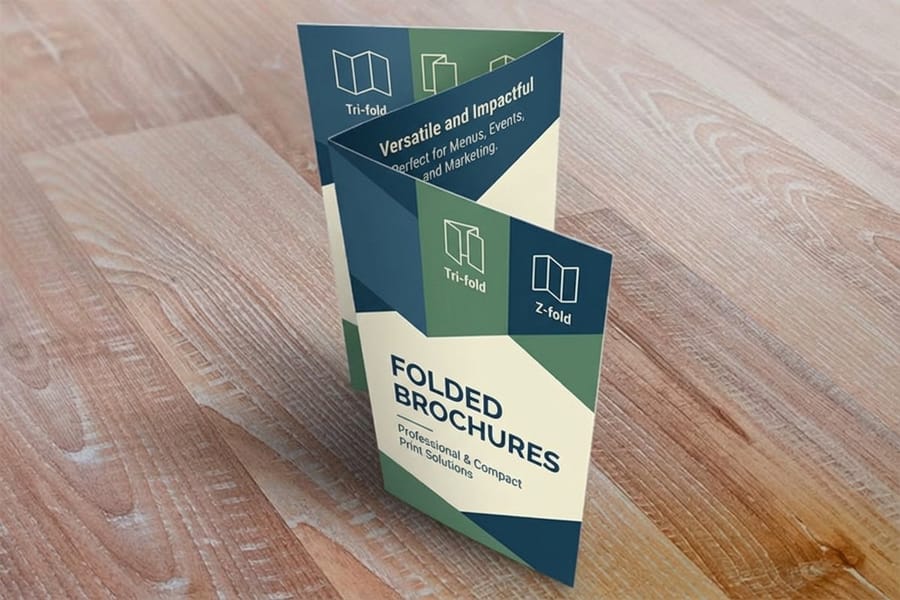
One more thing about the tri-fold that templates rarely label clearly. On the outside spread the panels run tuck flap, back panel, front cover from left to right. On the inside spread they mirror, so the tuck flap is now on the right. Put your cover art on the wrong end and the brochure folds into a piece whose front is blank. Full fold anatomy sits in brochure fold types explained, and the two-panel case is covered in the bi-fold setup guide.
Fold Tolerance Is the Spec Nobody Designs Around
A folding machine is accurate to roughly a sixteenth of an inch. That is the number worth remembering, because almost every complaint about a folded job traces back to a design that assumed the fold would land on a hairline.
What that tolerance means in practice: keep body copy 0.1875 inch back from any fold line, not just the 0.125 inch you would allow at a trimmed edge. A caption that starts an eighth of an inch from a crease reads fine on the proof and disappears into the valley on a third of the run. Do not center a thin rule or a logo on a fold. Do not butt two flat colors against each other exactly at a fold, because a sixteenth of an inch of drift turns the seam into a visible stripe of the wrong color. Running a photograph or a gradient across a fold is fine, since drift there is invisible.
Trim tolerance is separate and tighter, but it stacks with fold drift on the panels near the outside edges. That is the real argument for the safety box rather than eyeballing your margins. If you want the mechanics of why the cut moves, full bleed printing and how much bleed walks through it, and crop marks and bleed covers what to include in the export.
Stock matters here too. A standard brochure on 100 lb text folds crisply with no preparation. Move up to cover weight for a piece that has to stand on a counter and the coating on the outside of the fold will crack unless the sheet is scored first, which we do as part of the job when the stock calls for it. Paper types for brochure printing lays out where that line sits.
Working in the Template Without Breaking It

Place the template as the bottom layer, lock it, and build above it. Locking is the whole discipline. A template that gets nudged half a millimeter while you drag a photo is worse than no template, because it now looks authoritative and is wrong.
- Build the outside and inside as two separate spreads, each at full flat size. Do not build six individual panels and assemble them at the end.
- Set your document to the bleed size, 11.25 by 8.75 for the standard tri-fold, with the trim marked by the template rather than by the page edge.
- Convert type to outlines or embed the fonts, then export a print-ready PDF with bleed switched on. The print-ready PDF export guide has the exact dialog settings.
- Switch off the guide layer, check the exported PDF in a viewer, and confirm no fold lines or margin boxes survived.
- Work in CMYK from the start. Converting at the end shifts saturated blues and oranges, which is very visible on a large panel of flat color.
Then check the fold in your hand before you order the run. Print the exported PDF at full size on any office printer, fold it the way the finished piece folds, and read it. Panels that looked balanced on screen turn out crowded, and a call to action you placed on the back panel turns out to be the first thing a reader sees. That two minute test has saved more reprints than any preflight check.
When the layout is settled, folded brochures start at $57.11 and folded flyers at $68.54 if you want a lighter single-fold piece. For anything past eight panels of content, stop folding and switch to a stitched booklet from $240.55, where page count rather than panel width governs the layout.
Wally explains the blank template
Three panels, and one of them has to be shorter
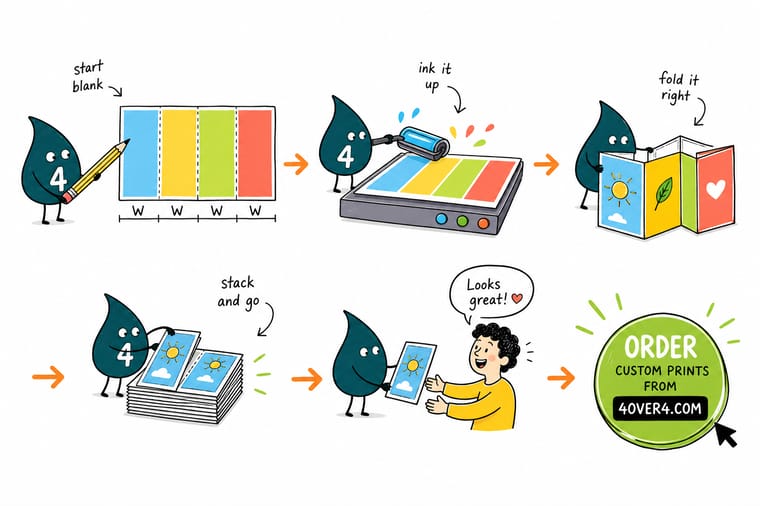
Wally lays the blank template flat and measures. Two panels at 3.6875 inches, one at 3.625. That last one is the panel that rolls inside, and if he gives it the same width as the others it hits the closing fold and bows the spine. He keeps the type 3/16 inch back from every crease, pushes the background art out past the trim to the bleed line, then switches off the guide layer so no fold marks print. Then he folds a paper copy by hand and reads it, because a panel that looks balanced on screen is often crowded in the hand.
Download a blank brochure template →
Specs and pricing
Sizes, folds and starting prices for the formats these templates fit
Pick the size and fold first, then take the panel widths from the matching template. Brochures and folded brochures run six flat sizes from 5.5 by 8.5 to 11 by 25.5 inches with a half fold, from 50 for $57.11. Folded flyers add the trifold, Z-fold and gate fold on the same six sizes, from 50 for $68.54. Live configuration options and starting prices come straight from the 4OVER4.COM configurator.


Print it
Order the piece your template was built for
Standard and folded brochures print on 100# gloss or silk/matte text, 70# uncoated text or 14pt gloss cover in 3 business days. Past eight panels, booklets take over with 8 to 60 saddle-stitched pages from 25 for $240.55.


Explore more
Where to go next
Six next reads: half, tri, Z, gate and double parallel folds, bi-fold dimensions panel by panel, why bleed is an eighth of an inch, text against cover weights at the fold, the brochure range and the blank template library.





By the numbers
Templates built to the trim our presses cut
Common Questions
Your blank template questions, answered
What is a blank brochure template?
It is an empty layout file, usually PDF, INDD or AI, built at the exact flat size of the printed sheet with four things already drawn on it: the trim box, a bleed box an eighth of an inch outside it, a safety box an eighth of an inch inside it, and the fold lines in their correct positions. There is no design in it. You place your artwork on layers above it, switch the guide layer off, and export. The value is that the fold positions and the panel widths are already correct for the machine that will fold your job.
Why are the three panels of a tri-fold template not the same width?
Because one panel has to sit inside the other two once the sheet is rolled closed. On an 11 by 8.5 flat sheet the outer panels are 3.6875 inches and the tuck-in panel is 3.625 inches, which gives that panel a sixteenth of an inch of clearance at the closing fold. Split 11 inches into three equal 3.6667 inch panels instead and the inner panel reaches the fold, pushes against it, and bows the spine of every copy in the run.
How much bleed does a brochure need?
0.125 inch on all four sides of the flat sheet, so an 11 by 8.5 brochure is built on an 11.25 by 8.75 canvas. Any background color, photo or panel block that is meant to run off the edge has to reach the bleed line, not the trim line. Cutting happens in lifts and the blade drifts slightly through the stack, so art that stops at trim leaves a white sliver on the copies at the bottom of the lift.
Can I stretch a letter-size template to make a legal-size brochure?
No, and this is the most common template mistake we see. Scaling a template scales the bleed and safety margins with it, so a template stretched from 11 to 14 inches ends up with roughly 0.159 inch of bleed and fold lines in the wrong places. Bleed and safety are fixed distances regardless of sheet size. Start from a template built for the size you are actually ordering, or set the panel widths yourself and keep bleed at 0.125 inch.
Should I leave the fold lines in the file I send?
No. Put them on their own layer and turn that layer off before exporting. Printed fold marks show up as thin rules across the panels on the finished brochure. What you should include is a 0.125 inch bleed and, if your export dialog offers it, crop marks placed outside the bleed box. Our production team folds from the job spec, not from marks drawn on your artwork.
Will heavy ink coverage crack when the brochure folds?
On anything from 100 lb cover upward, yes, unless the sheet is scored first. The fibers on the outside of the fold stretch and the coated surface splits, which shows as a white line through a dark panel edge. Scoring crushes a channel along the fold line before folding so the sheet bends instead of tearing. Brochures printed on text weights of 100 lb and below fold cleanly without it. If you are running a dark background across a fold, say so on the order and ask for a score.
Get Started
Template filled in? Let us fold it.
Send the flat spread with bleed, tell us the fold, and we score, fold and trim to the panel widths the template was built around.
Legal Disclaimer
Gold Standard guarantees apply to all standard orders placed through 4over4.com. Price match requires verifiable proof of a competitor's published price for an equivalent product with matching specifications and turnaround time. Satisfaction guarantee covers manufacturing defects and print quality issues. Contact support with order number and documentation.
