Quick Guide: Addressing a Postcard the Right Way
Knowing how to address a postcard correctly means your mail actually arrives. The recipient's address goes on the right half of the back, your message stays on the left, and the stamp sits in the top-right corner. Write clearly in dark ink. Use all caps for the address with no punctuation. Keep the address area free of stray marks so postal scanners can read it. 4OVER4 has helped 150,000+ businesses print and mail postcards that get delivered - with 99.8% on-time delivery across all orders.
Why Proper Postcard Addressing Still Matters in 2026
You'd think addressing a postcard is simple. And it is - once you know the rules. But get it wrong, and your card ends up in a dead letter pile instead of someone's hands. Whether you're sending vacation greetings, event invitations, or direct mail campaigns, the format hasn't changed much. USPS sorting machines read specific zones on your postcard. If your handwriting drifts into the wrong area or your address is missing a line, delivery gets delayed or fails entirely.
"Postcards /5"
| Quantity | Price Per Unit |
|---|---|
| 50 | $0.33 |
| 4,000 | $0.03 |
| 35,000 | $0.02 |
| 100,000 | $0.02 |
Ink Color
Finish
Scoring
Rounded Corners
Variable Data (Codes, Names, Etc.)
Total Sets
Proof Options
4OVER4 prints postcards for businesses and individuals across the country, and we've seen every addressing mistake in the book. This guide walks you through the exact layout, formatting, and tips to make sure every postcard you send lands where it should. You can even use our Online Designer to create print-ready postcards with pre-formatted address zones. Need other print project help? Check out our QR Code Generator for adding scannable links to your postcards, or learn How To Clean Rubber Stamps if you're hand-stamping return addresses.
Postcards
Starting from $16.48
Free Design Templates:
"Direct Mail Postcards /5Paper Type14pt Gloss Cover14pt Matte/Silk Cover14pt High Gloss UV Front; Coated BackInk Color4/0 : 4 Color Front; Blank Back4/1 : 4 Color Front; Black Ink Back4/4 : 4 Color Bot"
"3D Postcards /5"
Ink Color
Effect
Number of Flips
Effect Direction
Rounded Corners
Proof Options
The Complete Postcard Addressing Layout, Step by Step
How to address a postcard comes down to understanding three zones on the back of the card. Every postcard - whether it's a standard 4x6 or an oversized 6x11 - follows the same basic structure. The back is divided into a left half and a right half, with a vertical line (printed or imaginary) separating them. Here's what goes where.
The Left Side: Your Personal Message
The left half of the postcard back is your writing space. This is where your message lives - vacation updates, thank-you notes, promotional copy, event details. You've got roughly half the card to work with, so keep it concise. Don't let your handwriting or printed text cross the center line. Postal sorting machines scan the right side, and any stray ink in that zone can confuse the reader.
For business postcards, this left side is prime real estate for your offer, headline, or call to action. If you're designing a direct mail piece, consider how the message side works with the front design. Our guide on How To Make Flyers covers similar layout principles that apply to postcard messaging too.
The Right Side: Recipient Address Zone
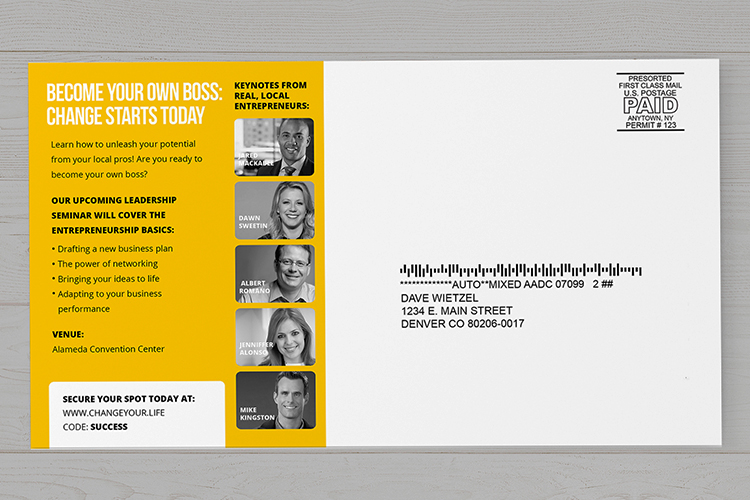
This is the business end of your postcard. The right half is reserved exclusively for the recipient's mailing address and postage. Nothing else belongs here. No doodles, no extra messages, no logos overlapping the address block.
The recipient's address should be positioned in the center-right area of this half. Write it in three or four lines:
- Line 1: Recipient's full name (or business name)
- Line 2: Street address, apartment or suite number
- Line 3: City, State, and ZIP code
- Line 4 (if needed): Country name for international mail
Use dark ink - black or dark blue works best. If you're handwriting, print clearly. Block letters are easier for both humans and machines to read.
Where the Stamp Goes
The postage stamp belongs in the top-right corner of the right side. This is non-negotiable. USPS machines look for postage in this exact spot. For standard postcards (minimum 3.5 x 5 inches, maximum 4.25 x 6 inches), postcard-rate stamps apply. Oversized postcards may require first-class letter postage instead.
If you're sending bulk mail for a business campaign, you'll use a printed postage indicia instead of a physical stamp. This goes in the same top-right position. 4OVER4's 3D Postcards and standard postcards all follow USPS size requirements, so the address zone is always in the right place.

Free Design Templates:
Return Address Placement
Your return address goes in the top-left corner of the right side - above the recipient's address. This is smaller text, usually two or three lines. It's not required by USPS for postcards, but it's smart to include one. If the card can't be delivered, it comes back to you instead of disappearing.
For business postcards, the return address doubles as branding. Include your company name, street address, and ZIP code. Keep it compact so it doesn't crowd the recipient's address below.
USPS Formatting Rules You Should Follow
USPS recommends a specific format for machine-readable addresses. Following these rules speeds up delivery and reduces errors:
- Use ALL CAPS for the entire address block
- Skip punctuation - no commas, periods, or hyphens in the address lines
- Left-align all address lines
- Use standard abbreviations: ST for Street, AVE for Avenue, APT for Apartment, STE for Suite
- Include the ZIP+4 code when you know it - this speeds sorting
- Leave at least 1/2 inch of clear space below the address for the barcode area
Here's an example of a properly formatted postcard address:
JANE SMITH
123 MAPLE AVE APT 4B
PORTLAND OR 97201-1234
That bottom half-inch of the right side? USPS prints an Intelligent Mail barcode there during processing. If you've got text, images, or decorative elements in that zone, the barcode can't print correctly. This is one of the most overlooked rules when people learn how to address a postcard.
Blank Templates
Handwritten vs. Printed Addresses
Handwritten postcards have a personal charm that printed ones can't match. But legibility matters more than style. If your handwriting is hard to read, print in block letters. Use a fine-point pen with dark, permanent ink. Felt-tip markers can bleed on glossy card stock.
For business mailings, printed addresses are the way to go. They're consistent, machine-readable, and professional. If you're running a direct mail campaign, variable data printing lets you personalize each card with a unique recipient address. Check out the Faq Hub for more printing and mailing tips.
Addressing Postcards for International Mail
Sending a postcard overseas? The format stays mostly the same, with a few additions. Write the destination country name in ALL CAPS on the last line of the address. Use the country's full English name - FRANCE, not FR. JAPAN, not JP.
Some countries format addresses differently. In Japan, addresses go from largest to smallest unit (prefecture, city, district, building). In the UK, the postcode goes on its own line. When in doubt, follow the recipient country's postal format for the local address lines, but always put the country name last in English.
International postcard postage rates differ from domestic. As of 2026, USPS charges more for international postcards than domestic ones. Check current rates before you stamp and send.
Addressing Postcards for Business Campaigns
Direct mail postcards follow the same addressing rules, but the stakes are higher. You're paying for printing, postage, and a mailing list. A bad address means wasted money. Here are tips specific to business postcard mailings:
- Clean your mailing list before printing - run it through USPS CASS certification to verify addresses
- Use USPS-compliant address blocks with proper font sizes (minimum 8pt for machine reading)
- Include a barcode clear zone at the bottom of the address side
- Consider Every Door Direct Mail (EDDM) if you're targeting entire neighborhoods - no individual addressing needed
If you're creating postcards for a campaign, you might also want to explore related print materials. Learn How To Make Envelopes for letter campaigns, or read about Custom Magnets Faq for alternative direct mail formats. For folded mailers, our guide on How To Fold A Brochure covers the basics.
Postcard Size Requirements for Mailing
Not every card qualifies for postcard-rate postage. USPS has strict size requirements:
- Minimum size: 3.5 x 5 inches
- Maximum size for postcard rate: 4.25 x 6 inches
- Maximum thickness: 0.016 inches
- Cards larger than 4.25 x 6 require first-class letter postage
Oversized postcards (like 5.5 x 8.5 or 6 x 11) still work great for marketing. They just cost more to mail. The addressing format stays identical regardless of size.
Below you'll find some industry data on postcard mailing and direct mail effectiveness, along with real examples of well-designed postcards and templates you can start with.
Postcard Addressing Mistakes That Delay or Kill Delivery
Even people who know how to address a postcard make these errors. Here are the most common ones - and how to avoid them.
- Writing across the center line. Your message bleeds into the address zone, and sorting machines can't distinguish your note from the address. Stay on your side.
- Putting the address on the left. The recipient's address must be on the right half. Left side is for your message only.
- Using light-colored ink. Pencil, light blue, or pastel inks don't scan well. Stick to black or dark blue.
- Skipping the ZIP code. Without a ZIP, your postcard relies on manual sorting, which slows delivery dramatically.
- Decorating the address area. Stickers, washi tape, or drawings in the barcode clear zone block machine processing.
- Wrong postage. Oversized postcards need letter-rate stamps, not postcard-rate. Check your card's dimensions before stamping.
4OVER4 prints postcards with pre-marked address zones and guide lines, so you always know exactly where to write. That small detail saves a lot of returned mail.
Postcards Built for Easy Addressing and Fast Delivery
Now that you know how to address a postcard, you need a card worth sending. 4OVER4 offers Postcards, Direct Mail Postcards, and 3D Postcards - all printed on thick, durable stock with clean address zones on the back. Every card meets USPS size and thickness requirements right out of the box.
Free Design Templates:
| Element | Correct Placement | Why It Matters |
|---|---|---|
| Recipient's Address | On the right-hand side, below the postage stamp. | This is the specific zone USPS automated sorting machines are programmed to scan. |
| Return Address | Top-left corner of the message area (optional but recommended). | If the postcard is undeliverable, this ensures it can be returned to you. |
| Personal Message | On the left-hand side, clear of the address and postage areas. | Keeps the mailing information clean and prevents scanning errors or confusion. |
| Postage Stamp | Top-right corner, directly above the recipient's address. | Machines are designed to detect postage in this exact spot to process the mail. |
The Left Side: Your Message This is the larger area, your canvas for whatever you want to say. Whether it's a quick "Wish you were here!" from a vacation spot or a special offer for a customer, this space is all yours.
The Right Side: The Destination This half is strictly business. It’s reserved only for the recipient's mailing address. Keeping this area clean, legible, and free of any extra notes is crucial because this is the exact spot the postal scanners read.
- Line 1: The Recipient's Name: Start with the full name of the person or the company. It's always best to skip nicknames to avoid any confusion.
- Line 2: The Street Address: This is the core delivery information—the building number and the street name. Feel free to use common USPS abbreviations like ST for Street, AVE for Avenue, and BLVD for Boulevard.
- Line 3: The City, State, and ZIP Code: This line pinpoints the location. Write the full city name, the two-letter state abbreviation (like CA for California), and the ZIP code.
- For an apartment, use APT.
- For a suite, use STE.
- For a building, use BLDG.
Addressing a Postcard to Canada: MS. HELEN SAUNDERS 1010 CLEARWATER DR OTTAWA ON K1A 0B1 CANADA
Addressing a Postcard to the United Kingdom: MR. THOMAS HOWARD 45 ABBEY RD LONDON NW8 9AY UNITED KINGDOM
Addressing a Postcard to Australia: CHLOE HARRIS 27 KANGAROO AVE SYDNEY NSW 2000 AUSTRALIA
- Line 1: Your Full Name or Company Name
- Line 2: Your Street Address
- Line 3: Your City, State, and ZIP Code
- Standard Domestic Postcards: To get the cheaper standard postcard rate, your card needs to be rectangular and fall within specific dimensions—usually between 3.5" x 5" and 4.25" x 6".
- Larger Postcards: If your postcard is bigger than the standard size, don't worry, it can still be mailed. It'll just be charged at the higher First-Class Mail letter rate.
- International Postcards: Sending a postcard to another country always requires an international stamp, which costs more than a domestic one.
- Design Compliance: Their experts make sure your postcard design checks all the postal requirement boxes, so you avoid costly delays or rejections.
- List Management: They can help you get, clean up, and manage your mailing lists to make sure you're targeting the right people.
- Bulk Mailing: They’ll handle all the sorting, bundling, and delivery to the post office, locking in the best possible postage rates for you.
- Apartment or Suite Numbers: Forgetting "APT 4B" or "STE 101" is a classic mistake. The mail carrier can get the postcard to the right building, but it will be undeliverable without the specific unit.
- Directional Indicators: Missing a simple "N" for North or "SW" for Southwest can send your postcard to an entirely different part of the city. Always include directionals like N, S, E, W if they are part of the official street address.
- Outdated ZIP Codes: People move, and ZIP code boundaries can sometimes be realigned. A quick check on the USPS website can confirm you have the most current five-digit or, even better, the full ZIP+4 code for the recipient.
Looking for sustainable options? Check out our Green Printing program for postcards made with recycled materials and eco-friendly inks.
Free Design Templates
"Ordered how to address a postcard from 4OVER4 and the quality blew me away. Sharp colors, premium feel, arrived 2 days early."
"Been using 4OVER4 for how to address a postcard for a year. Consistent quality every time. The online designer made it easy."
"Switched to 4OVER4 and saved 40% on how to address a postcard. Better quality than my old printer. 60+ paper options."
"4OVER4's how to address a postcard helped us look more professional. Clients notice the difference."
Your Postcard Addressing Questions, Answered
Which side of a postcard do you write the address on?
The address goes on the back of the postcard, on the right half. The left half is reserved for your personal message. The front of the postcard is for your image or design. This layout is standard across USPS and most international postal services.
Do I need a return address on a postcard?
USPS doesn't require a return address on postcards, but it's a good idea to include one. Place it in the top-left corner of the right side, above the recipient's address. If the card is undeliverable, it'll come back to you instead of getting discarded.
What size postcard qualifies for postcard-rate postage?
USPS postcard rate applies to cards between 3.5 x 5 inches and 4.25 x 6 inches, with a maximum thickness of 0.016 inches. Anything larger requires first-class letter postage. 4OVER4's standard Postcards are designed to meet these requirements.
Can I print a QR code on the address side of a postcard?
Yes, but only on the left (message) side. Never place a QR code in the address zone or barcode clear area on the right side. Use 4OVER4's QR Code Generator to create codes that link to your website, menu, or landing page.
Should I use cursive or print when addressing a postcard by hand?
Print in block letters using dark ink. Cursive can be difficult for postal sorting machines to read, which may delay delivery. All caps with no punctuation is the USPS-recommended format for the best machine readability.
How do I address a postcard to another country?
Follow the same format as domestic mail, but add the destination country name in ALL CAPS on the last line. Use the full English name of the country. International postcard postage rates are higher than domestic, so check current USPS rates before mailing.