What You Need to Know About Carbonless Forms
Carbonless Forms create instant duplicate copies without messy carbon paper. They're built for invoices, receipts, work orders, and any document that needs multiple copies on the spot. 4OVER4 prints Carbonless Forms in 2-part, 3-part, and 4-part configurations so every party walks away with their own copy. With 25+ years in the printing business and 150,000+ businesses served, you're getting forms that actually perform when the pressure's on - literally.
Carbonless Forms
Starting from $120.82
Order Premium Custom Carbonless Forms for Business
Your Go-To Resource for Carbonless Forms
"Carbonless Forms /5"
| Quantity | Price Per Unit |
|---|---|
| 100 | $1.21 |
| 500 | $0.31 |
| 900 | $0.22 |
| 5,000 | $0.12 |
Ink Color
Binding
Binding Edge
Proof Options
Carbonless Forms are one of those products you don't think about until you desperately need them. A contractor finishes a job and needs a signed work order - one copy for the client, one for the office. A restaurant supply company processes a delivery and hands over a receipt on the spot. That's where these forms shine.
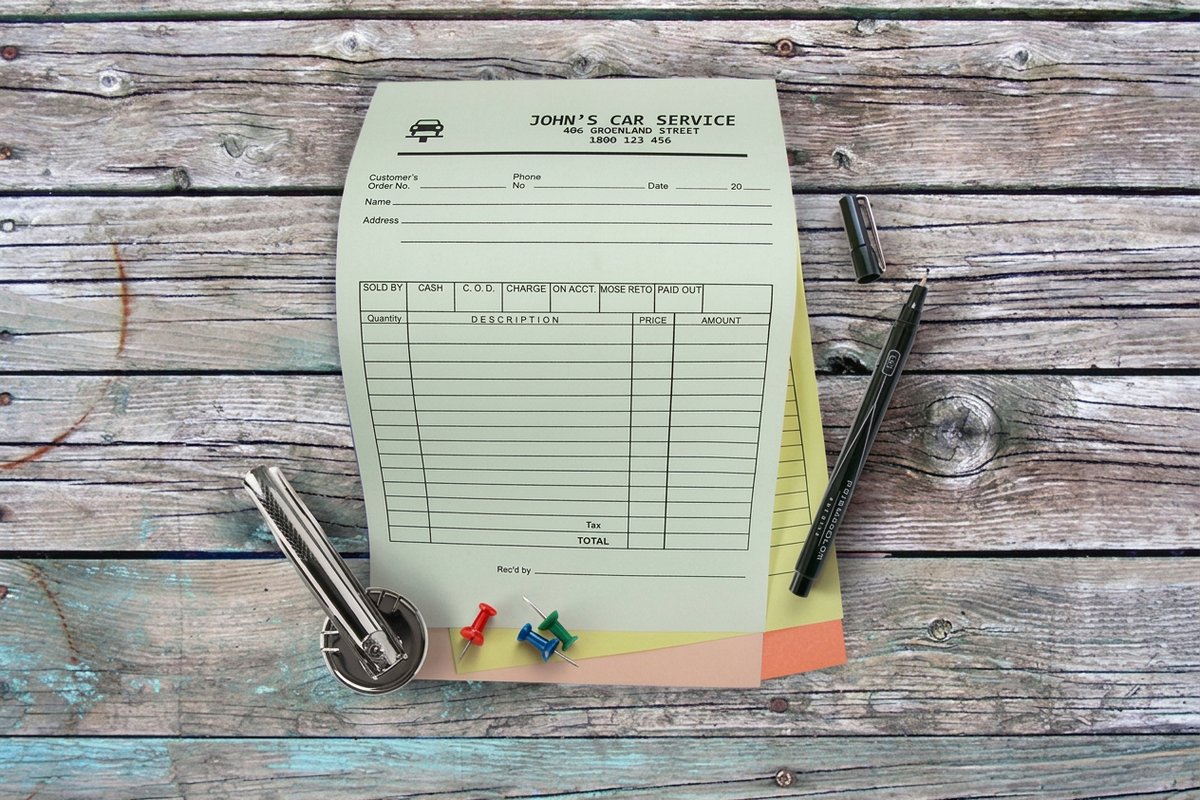
Unlike regular paper, Carbonless Forms use a special coating that transfers your writing or printing from the top sheet to every sheet beneath it. No carbon paper. No smudging. Just clean, readable copies every time. Check out real-world examples at 4OVER4 Carbonless Forms to see how other businesses put them to work.
Whether you're building forms from scratch using the Online Designer or starting with one of 4OVER4's ready-made Design Templates, getting professional Carbonless Forms printed is straightforward. And if you're into keeping your office supplies organized, you might also want to know How To Clean Rubber Stamps - because if you're using carbonless forms, chances are you're stamping them too.
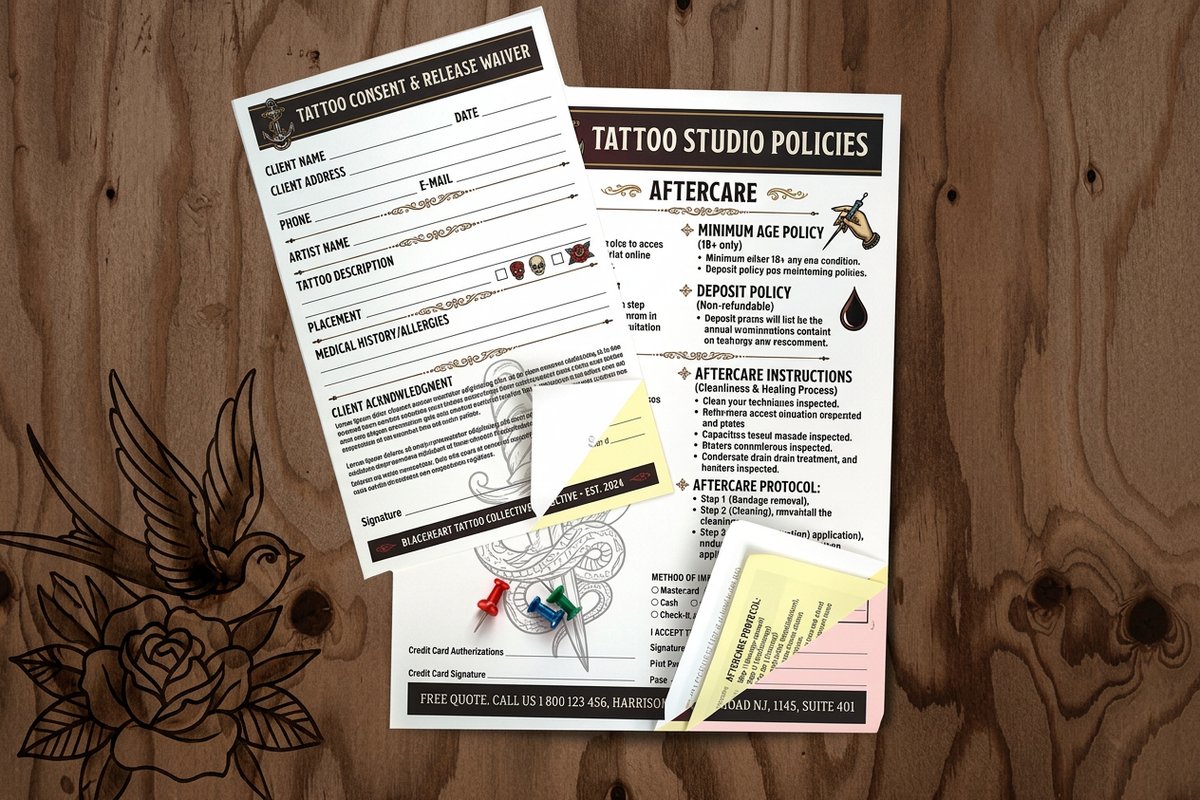
Here's a closer look at the Carbonless Forms options available and what real printed forms look like in action.
How Carbonless Forms Work and When to Use Them
The Chemistry Behind the Copy
Carbonless Forms - sometimes called NCR forms (No Carbon Required) - rely on micro-encapsulated dye coated onto the paper. When you write or print on the top sheet, the pressure breaks open tiny capsules on the underside. That dye reacts with a clay coating on the sheet below, creating an instant copy.
The top sheet is called the CB (Coated Back). Middle sheets are CFB (Coated Front and Back). The bottom sheet is CF (Coated Front). Stack them together, apply pressure, and you've got clean duplicates without any mess. It's simple chemistry that's been reliable for decades.
2-Part, 3-Part, and 4-Part - Which Do You Need?
2-part Carbonless Forms give you an original and one copy. Perfect for simple receipts, basic invoices, or delivery confirmations where only two parties need documentation. Think plumber hands a receipt to the homeowner, keeps one for billing.
3-part Carbonless Forms add a third copy. This is the most popular configuration. The customer gets one, the office gets one, and the field technician keeps one. Service companies, auto repair shops, and medical offices use 3-part forms constantly.
4-part Carbonless Forms handle complex workflows. Construction companies love these - one copy for the client, one for the project manager, one for accounting, one for the job file. If your paperwork touches four different desks, 4-part is the way to go.
Common Uses Across Industries
Carbonless Forms aren't a niche product. They're everywhere, even in 2025. Here's where they show up most:
- Service contractors - HVAC technicians, electricians, and plumbers use work order forms on every job site to document labor, parts, and customer signatures
- Restaurants and food service - Purchase orders for suppliers, delivery receipts, and catering agreements all benefit from instant multi-copy documentation
- Auto repair shops - Repair authorization forms, parts orders, and final invoices need copies for the customer and the shop's records
- Healthcare offices - Patient intake forms, referral documents, and billing receipts often require multiple copies for different departments
- Real estate - Inspection checklists, maintenance requests, and property management forms keep landlords and tenants on the same page
If you're exploring other ways to get your brand in front of customers, check out the full range of Marketing Materials Printing options at 4OVER4. And for inspiration across product types, the Showcase gallery has real examples from real businesses.
Designing Carbonless Forms That Actually Get Used
Layout and Readability Come First
A Carbonless Form that's hard to read is a Carbonless Form that causes problems. Keep your layout clean. Use clear section headers, adequate spacing between fields, and fonts that are legible at small sizes. Remember - the copies on lower sheets will be slightly lighter than the original, so thin fonts and tiny text don't translate well.
Start with your company logo and contact info at the top. Add a form number or sequential numbering if you need to track documents. Include clear labels for every field - date, customer name, address, description of work, totals, signatures. The more structured your form, the fewer errors your team makes in the field.
"We switched to custom Carbonless Forms with pre-printed fields for our HVAC service calls. Callbacks about missing information dropped by half because the technicians just fill in the blanks now."
- Derek L., ★★★★★
Color Coding Your Parts
One of the smartest things you can do with multi-part Carbonless Forms is color-code each sheet. White for the original, yellow for the office copy, pink for the customer copy. When someone grabs the pink sheet, they know exactly what it is without reading a word. 4OVER4 offers standard color combinations that make sorting effortless.
Color coding also prevents mix-ups. If your accounting department only processes yellow sheets, they'll immediately spot a white original that ended up in the wrong pile. It's a small detail that saves real time.
Numbering and Perforations
Sequential numbering turns your Carbonless Forms into trackable documents. Every form gets a unique number, making it easy to reference specific transactions, follow up on disputes, or audit your records. For businesses that process dozens of forms daily, this isn't optional - it's necessary.
Perforations let you tear forms cleanly from a pad or book. Nobody wants to hand a customer a receipt with a ragged edge. 4OVER4 can add perforations exactly where you need them, whether that's at the top of a pad-style form or along a detachable section within the form itself.
If you're working on other printed materials alongside your forms, you might find these guides helpful: learn How To Fold A Brochure for your marketing collateral, discover How To Make Flyers for promotional handouts, or explore How To Make Envelopes for mailing your invoices.
Choosing the Right Paper and Finish for Your Forms
Paper Weight Matters
Carbonless paper comes in standard weights designed for the NCR process. Heavier stock on the top sheet gives a more professional feel and holds up better to handling. The key is that all sheets in your set need to be compatible - the coating chemistry has to match across parts.
For forms that get handled roughly - think construction sites, warehouses, or outdoor service calls - a heavier top sheet resists tearing and moisture better. Office-based forms can use standard weights without any issues.
Ink Colors and Print Quality
Most Carbonless Forms are printed in black or dark blue ink on the front of the top sheet. This gives the best contrast and ensures the transferred copy is legible on all sheets. You can add spot colors for your logo or section headers, but keep body text in a single dark color for clarity.
Full-color printing on Carbonless Forms is possible but comes with a trade-off. Heavy ink coverage can sometimes interfere with the pressure-transfer process. If you want a colorful header with your branding, keep the form fields themselves simple and dark.
Padding vs. Book Binding
Carbonless Forms typically come in two binding styles. Padded forms stack all sets together with a chipboard backer and glue binding at the top or side. You tear off each set as you use it. Pads work great for desk use and are the most economical option.
Book-bound forms interleave the parts with a cardboard separator between each set. They're easier to write on in the field because the separator provides a hard writing surface. Books cost a bit more but are worth it for mobile workers who fill out forms on the hood of a truck.
For more printing tips and product guidance, browse the full Faq Hub at 4OVER4. You'll also find creative ideas for Custom Magnets Faq and other branded items that pair well with your business forms.
Digital vs. Carbonless - Why Paper Still Wins in the Field
Yes, digital forms exist. And yes, they're great when you've got Wi-Fi, a charged tablet, and a customer who's comfortable with e-signatures. But in the real world? Jobsites don't always have signal. Tablets break. Batteries die.
Carbonless Forms work every single time. No login required. No software updates. No "sorry, my tablet crashed." A pen and a form - that's it. The customer signs, tears off their copy, and you're done in seconds. For field service, delivery, and trade work, paper carbonless forms remain the fastest, most reliable documentation method available.
That doesn't mean you can't use both. Many businesses use Carbonless Forms in the field and then scan the office copy into their digital system later. Best of both worlds.
Here are some real examples of Carbonless Forms in action, plus a blank template to help you get started with your design.
Blank Templates
Mistakes That Ruin Your Carbonless Forms
Writing with the wrong pen. Ballpoint pens work best on Carbonless Forms because they apply consistent pressure. Felt-tip markers and gel pens don't press hard enough to activate the dye capsules on lower sheets. If your copies are coming out faint, the pen is usually the problem.
Stacking forms without separators. Storing loose Carbonless Forms in a pile without cardboard dividers between sets causes phantom marks. Pressure from the stack activates the coating, and you end up with smudges and ghost images on sheets that haven't been used yet.
Designing with tiny fonts. Text below 8pt doesn't transfer cleanly to the second or third copy. 4OVER4 recommends keeping body text at 10pt minimum. Field labels can go slightly smaller, but anything customers need to read should be generous in size.
Forgetting to specify the part order. If you don't tell the printer which color goes on top, you might get your sets assembled backwards. Always confirm: white on top, canary second, pink third. Getting this wrong means reprinting the entire order.
Skipping sequential numbering. Forms without unique numbers are nearly impossible to track. If a dispute comes up three months later, good luck finding the right form in a stack of unnumbered duplicates.
Get Started with 4OVER4 Carbonless Forms
Ready to order? 4OVER4 prints custom Carbonless Forms in 2-part, 3-part, and 4-part configurations with options for sequential numbering, perforations, and color-coded sheets. Head to Carbonless Forms Printing to see all available sizes, paper options, and pricing tiers.
Below you'll find current pricing, full product specifications, and reviews from businesses already using 4OVER4 Carbonless Forms for their daily operations.
Ink Color
Binding
Binding Edge
Proof Options
"Ordered carbonless forms from 4OVER4 and the quality blew me away. Sharp colors, premium feel, arrived 2 days early."
"Been using 4OVER4 for carbonless forms for a year. Consistent quality every time. The online designer made it easy."
"Switched to 4OVER4 and saved 40% on carbonless forms. Better quality than my old printer. 60+ paper options."
"4OVER4's carbonless forms helped us look more professional. Clients notice the difference."
"We order 3-part Carbonless Forms every quarter for our auto shop. The copies are always crisp, the numbering is accurate, and they ship fast. Can't ask for more than that."
- Maria R., ★★★★★
Common Questions About Carbonless Forms
What's the difference between 2-part and 3-part Carbonless Forms?
A 2-part Carbonless Form produces one original and one copy - two sheets total. A 3-part form adds a third sheet, giving you an original plus two copies. Choose based on how many people or departments need their own copy of each document.
Can I print full color on Carbonless Forms?
Yes, but with a caveat. Full-color printing works well for logos and headers on the top sheet. However, heavy ink coverage across the entire form can reduce transfer quality on lower sheets. Keep form fields in a single dark color for the best results on all copies.
What type of pen works best with Carbonless Forms?
Ballpoint pens are ideal. They apply firm, consistent pressure that activates the micro-encapsulated dye between sheets. Felt-tip pens and markers don't press hard enough, resulting in faint or incomplete copies on the lower parts.
How should I store unused Carbonless Forms?
Store them flat in a cool, dry location away from direct sunlight. Keep cardboard separators between each form set to prevent accidental pressure marks. Heat and humidity can degrade the chemical coating over time, so avoid storing them in vehicles or warehouses without climate control.
Can Carbonless Forms include sequential numbering?
Absolutely. 4OVER4 offers sequential numbering on all Carbonless Forms. Each set gets a unique number printed in the same position, making it easy to track invoices, work orders, and receipts. This is especially useful for accounting and dispute resolution.
Are Carbonless Forms available as pads or books?
Both options are available. Padded forms are glued at the top with a chipboard backer - great for desk use. Book-bound forms include cardboard separators between each set, making them better for field use where you need a hard writing surface.
"I run a small landscaping company and we go through about 200 Carbonless Forms a month. The book-bound format is perfect for writing up estimates on-site. Clients love getting a clean copy right away."
- Troy K., ★★★★☆