
What Preflight Catches Before Your Job Ever Prints


Preflight is the pre-takeoff check for your print file. Here is what it catches, how it differs from prepress, and how our free proof runs it for you on every order.
Preflight is the review that confirms a print file is correct before it goes on press. It flags the usual print killers: missing bleed, low-resolution images, RGB color, unembedded fonts, and stray transparency. Preflight is the inspection, prepress is the repair, and at 4OVER4 a free file check runs preflight for you on every order.
Start here
The check your file gets before the press
Preflight confirms a file is ready to print before it ever reaches the press. It flags missing bleed, low-resolution images, RGB color, unembedded fonts, and stray transparency, so they are fixed on the ground, not after a run. Preflight inspects, prepress repairs. The checklist below shows what a preflight pass looks for.
What the preflighting process is

Preflight means checking a print file for errors before it goes on press. It is the review that confirms a print file is complete and correct before it goes on press: bleed extends past the trim, images hold their detail at final size, color is CMYK, fonts are embedded, and live transparency is flattened. The name comes from aviation, where a pilot runs a preflight checklist before takeoff, and the intent is identical: catch every problem on the ground, never in the air. For a print job, that means catching file issues before ink hits paper.
In practice, preflight combines software and a trained eye. Automated tools scan the file against a set of rules, measuring image resolution, checking for bleed, reading color modes, and confirming fonts are embedded. Anything that fails a rule gets flagged for correction before the job moves forward. The check happens before the file is imposed and sent to plate or digital raster, which is the whole point of running it: a problem caught here costs one corrected upload, while the same problem caught later costs the entire run.
The payoff is consistency. A file that passes preflight prints the way it was designed, from the first flyer to the last brochure, with no surprises. Preflight inspects, prepress repairs, and a proof is the later step where you approve how the corrected file will actually look. For the full workflow that gets a file through preflight on the first try, pair this guide with our walkthrough on creating print-ready files.
Common issues detected during preflight

Preflight hunts for the handful of problems that most often ruin a print run. Missing bleed is first: when artwork stops at the trim instead of extending 0.125 in past it, a slight shift in the cut can leave a thin white sliver along the edge. Low-resolution images are next, since anything under about 300 DPI at final size prints soft or blocky, and artwork pulled off a website is the usual offender because it was never built for print size.
RGB color gets flagged because screen color can shift on a process-ink press, with the brightest blues and greens the first to dull, and unembedded fonts are caught because a typeface the press does not have will be substituted, quietly breaking your layout and reflowing your line breaks. Finally, live transparency and overprint can render unpredictably, so preflight surfaces them to be flattened first.
None of these are exotic. They are the everyday mistakes that slip into almost any file, which is exactly why an automated check is so valuable. Each one takes a few minutes to fix in the source file and every one of them is expensive to fix after the press has run. The reference table below lists each issue with its fix, and our guide on bleed and trim covers the most common flag in depth.
Preflight vs prepress

Preflight and prepress are often confused, but they are not the same thing. Preflight is one step inside the larger prepress stage. Think of preflight as the inspection: it identifies what is wrong with a file. It does not, on its own, fix anything.
Prepress is the broader preparation stage that turns an ordered job into something a specific press can run. It includes acting on what preflight found, converting color, imposing multiple pages into printer signatures, and generating the plates or digital raster the press needs. Prepress is where the file is actually made ready for a particular machine and stock.
The simplest way to hold the two apart: preflight tells you what needs attention, and prepress does the work to make the file truly press-ready. Both happen before a single sheet prints, and together they are why a well-run print shop produces consistent results. Our online design tool helps you hand off a file that sails through both.
How 4OVER4 free proofs help

Here is the part that matters most for you: at 4OVER4, you do not have to run preflight yourself. Every order goes through a free file check, which is preflight performed on your behalf. When you upload your artwork, our tools and a second set of eyes scan it for the common issues before the job reaches the press.
If something is off, a missing bleed, a low-resolution image, an RGB element, an unembedded font, we flag it so it can be corrected. That single step prevents the most expensive surprise in printing: discovering a flaw only after a full run has already printed, when the only remedy is a costly reprint.
It turns ordering into a low-risk decision. Even if you are not certain your file is perfect, the free proof catches what you missed, so you can order a stack of flyers, brochures, or posters with confidence. The steps below show how to prepare a file that passes on the first try.
Order with confidence

Once you understand preflight, ordering stops being a gamble. Prepare your file the way a press expects, upload it, and let our free file check confirm it. If everything passes, your job prints exactly as designed. If not, you hear about it before anything prints, not after.
That safety net is the whole point. Preflight and our free proof remove the fear that keeps people from ordering print at all, the worry that a small file mistake will turn into a large bill. With the check in place, the risk simply is not there.
From here it is the ordinary decisions: product, size, stock, finish, and quantity, all set in the configurator with the price updating live. Browse the range in brochure printing, or start with the flyers below and let the specs panel guide you.
Wally clears your file for takeoff
Bleed, resolution, color, fonts, all checked
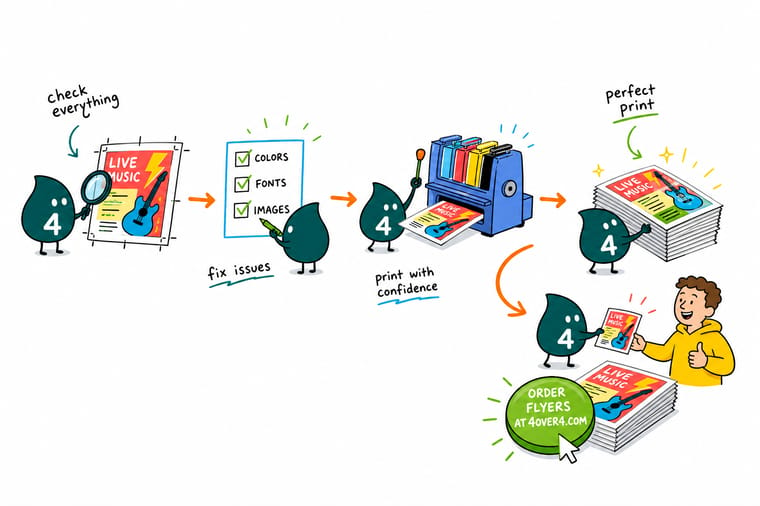
Wally runs every file through a preflight walk-around: bleed present, images sharp, color in CMYK, fonts locked in, transparency flattened. Anything off gets flagged on the ground, never after a full run. At 4OVER4 that check is free on every order, so you upload once and print with confidence.
Order with confidence →Quick reference
What preflight flags, and the fix
These are the issues a preflight pass looks for most, and how to clear each one before you upload.
| Issue | Fix | Why it matters |
|---|---|---|
| Missing bleed | Add 0.125 in past trim | Art that stops at the trim can leave a thin white sliver if the cut shifts. Preflight flags edges without bleed. |
| Low resolution | 300 DPI at final size | Images under about 300 DPI at print size come out soft or blocky. Preflight measures effective resolution and warns you. |
| RGB color | Convert to CMYK | Screen RGB can shift on press. Preflight catches RGB elements so color prints the way you expect. |
| Unembedded fonts | Embed or outline | A font the press does not have gets substituted, wrecking your layout. Preflight flags any font that is not embedded or outlined. |
| Stray transparency | Flatten the file | Live transparency and overprint can render unpredictably. Preflight surfaces these so they are flattened before printing. |
Step by step
Pass preflight in 6 steps
- Set the document to final trim and bleed Start from the exact product size and add 0.125 in of bleed on every side, with a safe margin inside, before you check anything else.
- Confirm color is CMYK Convert any RGB assets to CMYK so your preview matches process-ink output and preflight has nothing to flag on color.
- Check every image at 100 percent View each image at actual size to confirm it holds about 300 DPI. Replace anything soft rather than enlarging it.
- Embed or outline all fonts Package the fonts into the file or convert type to outlines so nothing can be substituted on our system.
- Flatten and export a press-ready PDF Flatten transparency and export to PDF/X-1a with bleed and crop marks, which clears most preflight issues automatically.
- Upload and let our free file check confirm it Send the file with your order and our free proof runs its own preflight, flagging anything left before the press touches it.
Specs and pricing
Flyer specs and live pricing
Once your file passes preflight, size, stock, and quantity set the price. Here are the live specs and price-per-unit for flyers at 4OVER4.

| Quantity | Price Per Unit | Total |
|---|---|---|
| 50 | 79.1¢ | $39.54 |
| 100 | 57.1¢ | $57.11 |
| 200 | 37.3¢ | $74.69 |
| 300 | 28.6¢ | $85.68 |
| 400 | 24.4¢ | $97.76 |
| 500 | 21.8¢ | $108.75 |
| 600 | 18.7¢ | $112.03 |
| 700 | 16.5¢ | $115.33 |
Print it
Order with a free file check on every job


See it in use
Real print work, produced in-house







Explore more
Where to go next







By the numbers
The file check every order passes and its resolution target
Common Questions
Common questions about preflight in printing
What is preflight in printing?
Preflight means checking a print file for errors before it goes on press. It is the review that confirms a print file is complete and correct before it goes on press. The name is borrowed from aviation, where pilots run a preflight checklist before takeoff, and the idea is the same: catch every problem on the ground, not in the air. In printing, preflight software and a trained eye scan a file for the issues that ruin a job, such as missing bleed, low-resolution images, RGB color, unembedded fonts, and stray transparency. Anything flagged is fixed before printing, which is what keeps the final piece consistent and error-free.
What issues does preflight detect?
Preflight looks for the handful of problems that most often ruin a print run. Missing bleed, where artwork stops at the trim instead of extending 0.125 in past it, can leave a white sliver after cutting. Low-resolution images below about 300 DPI at final size print soft or blocky. RGB color can shift on a process-ink press, and the brightest blues and greens dull first. Unembedded fonts get substituted if the press does not have them, which breaks the layout and reflows the line breaks. And live transparency or overprint can render unpredictably. Preflight surfaces each of these so they are corrected before the file prints.
What is the difference between preflight and prepress?
Preflight is one part of prepress, not the same thing. Preflight is the inspection step: it identifies what is wrong with a file. Prepress is the broader stage that comes after printing is ordered and before the press runs, and it includes fixing the issues preflight found, converting color, imposing pages, generating plates or a digital raster, and preparing the file for a specific press and stock. In short, preflight tells you what needs attention, and prepress does the work to make the file truly press-ready.
How do 4OVER4 free proofs help?
Every order at 4OVER4 runs through a free file check, which is preflight you do not have to perform yourself. When you upload your artwork, a second set of eyes and our tools scan it for the common issues, such as missing bleed, low resolution, RGB color, and unembedded fonts, before the job ever reaches the press. If something is off, we flag it so it can be corrected, which prevents the expensive surprise of discovering a flaw only after a full run has printed. The proof you approve afterward is the separate step, covered in our guide to proofing in printing, and it catches the things preflight never looks at, such as a wrong phone number or an old logo. Our guide to creating print-ready files covers the setup that clears the check first time. It is a safety net that makes ordering with confidence the default.
How do I prepare a file that passes preflight?
Build the file the way a press expects. Start at the exact trim size with 0.125 in of bleed and a safe margin, work in CMYK, and place images that are about 300 DPI at their final size. Embed or outline every font, flatten transparency, and export a press-ready PDF, ideally PDF/X-1a, with bleed and crop marks included. Doing those things clears almost every issue preflight looks for. If you would rather not build the file from scratch, our online design tool bakes most of these rules in, and our free file check confirms the result.
What does it cost, and does preflight change the price?
Preflight itself does not add to your price. Running your artwork through our free file check is included with every order, so the safety net costs nothing. The print price is set by the usual levers, quantity, size, paper stock, and finish, and it updates live in the configurator as you choose. What preflight saves you is the far larger cost of a mistake: catching a missing bleed or a low-resolution image before printing avoids the reprint, wasted stock, and lost time that the same flaw would cause after a full run.
What does preflight mean?
Preflight means checking a print file for errors before it goes on press. It is a fixed inspection, not an opinion: the file is measured against press rules for bleed, image resolution, color mode, embedded fonts, and live transparency, and anything that fails a rule is flagged for correction. The word is borrowed from the aviation checklist a pilot runs before takeoff, and it carries the same logic, which is that problems are cheap on the ground and expensive in the air. See our guide to creating print-ready files for the setup that passes on the first try.
What happens if a file fails preflight?
Nothing prints. The job pauses and you are told exactly what was flagged, such as artwork that stops at the trim with no 0.125 in of bleed, an image under about 300 DPI at final size, RGB color that needs converting to CMYK, or a font that was never embedded. Most of these are fixed in the original design file in a few minutes and re-uploaded, and the job resumes from where it stopped. A failed preflight is not a rejection, it is the step that stops a flawed file from becoming a flawed print run. The most common flag is covered in bleed and trim explained.
Is preflight the same as proofing?
No. Preflight is the technical check that the file can print correctly, and it catches missing bleed, low resolution, RGB color, unembedded fonts, and stray transparency. A proof is what you look at afterward to confirm the content and design are what you intended, which is where a wrong phone number, an old logo, or a headline you meant to change gets caught. Preflight is our job, approving the proof is yours, and a piece only prints right when both have happened. Read what proofing is in printing for what to check on a proof before you approve it.
Get Started
50 flyers cost $39.54 once preflight clears
Prepare your artwork, bring it to 4OVER4, and our free file check runs preflight before the press does. Adjust product, size, and quantity and watch your price update live.
Legal Disclaimer
Gold Standard guarantees apply to all standard orders placed through 4over4.com. Price match requires verifiable proof of a competitor's published price for an equivalent product with matching specifications and turnaround time. Satisfaction guarantee covers manufacturing defects and print quality issues. Contact support with order number and documentation. On-time delivery rate based on tracked orders 1999 to 2026. Individual results may vary based on shipping carrier performance.
