
Green Printing Practices Guide for 2026


Your green printing practices guide for a cleaner office
Green printing practices cover every decision that shrinks the environmental footprint of your print jobs, from the paper stock you pick to the ink that hits the sheet. 4OVER4.COM has spent 25+ years helping 150,000+ businesses print smarter, and that includes offering green printing options that never sacrifice quality. If you want a guide that actually changes how your office operates, you are in the right place.
Every company, whether a five-person startup or a 500-seat corporate office, generates print waste. Reducing it does not mean you stop printing. It means you print with intention. You choose better materials, you rethink defaults, and you partner with a printer that takes sustainability as seriously as color accuracy.
What green printing actually means

Green printing uses sustainable, eco-friendly methods across the whole production cycle. That means recycled and FSC-certified paper stocks, vegetable-based or soy-based inks, energy-efficient equipment, and waste reduction at every stage. It is not only about recycling old printouts. It is about making better choices before the ink ever touches the page.
When you work with a printer committed to green practices, you cut out toxic chemicals, volatile organic compounds, and unnecessary solvents, and you replace them with natural alternatives that perform just as well. Products like business cards and stationery, marketing collateral, and packaging can all be produced with a lighter footprint, so being responsible never costs you quality.
Why green printing matters for your business

Going green is not only about feeling good. It drives real results. Cleaner air from non-toxic inks helps people focus, cutting waste saves money on supplies, and customers increasingly prefer brands that show environmental responsibility.
Here is what a green printing practices guide delivers once you put it to work across the office.
- Sharper focus. Cleaner air quality from low-VOC inks and less chemical exposure helps employees think clearly and respond faster.
- Higher morale. Staff who see real sustainability investment report better concentration and more pride in their work.
- Lower costs. Duplex defaults, draft mode, and consolidated runs cut paper and toner spend over a fiscal year.
- Smaller carbon footprint. Fewer deliveries, less waste hauling, and efficient equipment shrink overall emissions.
- Stronger brand. Clients notice when your Black Hangtags, packaging, and collateral are printed on recycled or sustainably sourced stock.
Green printing versus a green office

Green printing is one piece of a bigger picture. It focuses on the printing process itself, the inks, the substrates, the equipment settings, and the waste output. A green office covers more, from energy-efficient lighting and HVAC to non-toxic cleaning products and recycled furniture.
Printing is one of the most resource-heavy activities in any office. Paper, toner, electricity, and cartridges add up fast. According to the Environmental Paper Network, the paper industry is the fourth largest source of greenhouse gas emissions among manufacturing sectors, so green printing practices tackle one of your largest impacts directly.
A truly green office combines both. You optimize the physical space for efficiency, and you optimize the print workflow for sustainability. That means proofing digitally before you print, consolidating print runs, and choosing materials that recycle or compost after use.
Print it green
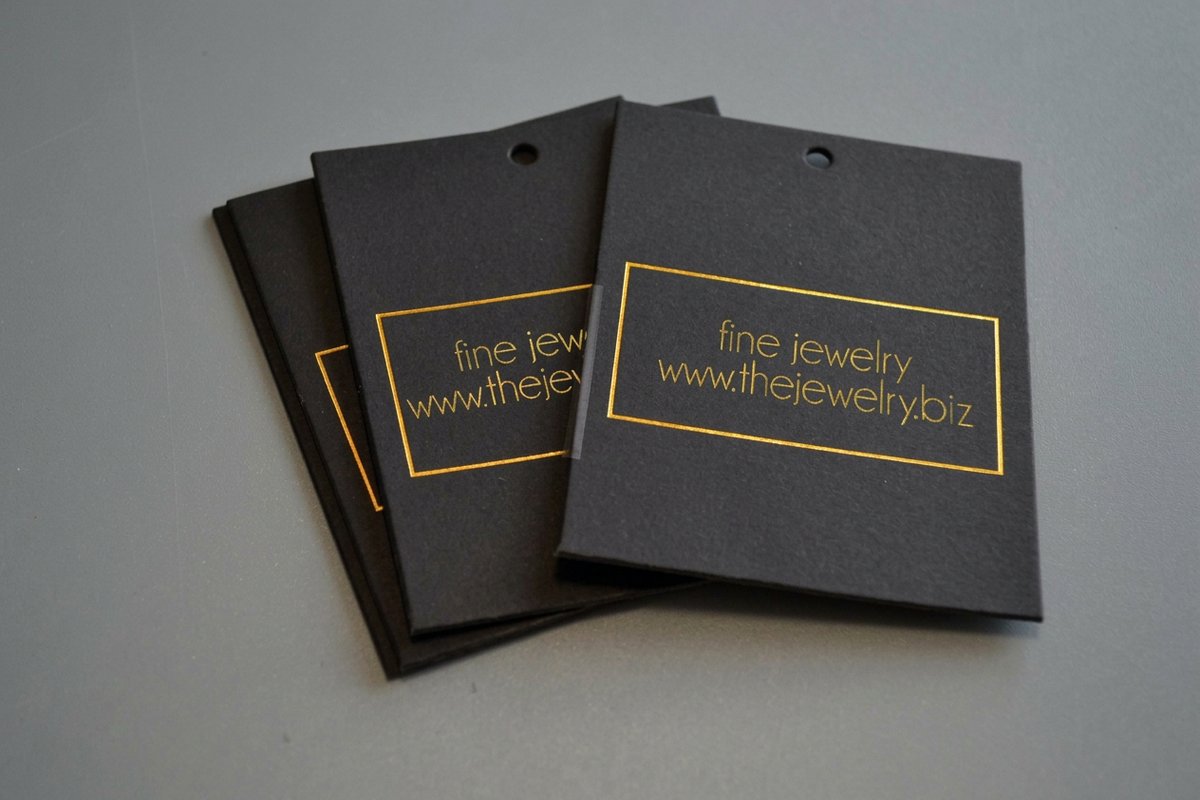
Hang tags on sustainable stock
Uncoated recycled stocks give hang tags a natural feel that signals sustainability the moment a customer holds them.
Ten practical ways to make your printing greener
This is where the guide gets tactical. These are specific changes you can put in place this week. Work down the list in order, tick each one off, and the first four alone will change what your office spends on paper and toner by the end of the month.
- Turn on duplex at the driver and on the device panel today. Default to duplex. Two-sided printing is the fastest way to halve paper use. Set every printer to duplex by default and most people will not even notice. Change it in both places, because a driver setting is overridden the moment somebody prints from the panel or from a phone.
- Make draft the standard quality for anything that stays in the building. Use draft or fast mode. High-resolution printing burns more toner and energy. Reserve standard quality for client-facing work and let internal reports print in draft.
- Send text-only documents to a monochrome queue. Print in black and white. Color pulls far more toner. For text-heavy contracts, memos, and emails, monochrome keeps color cartridges untouched.
- Lock the settings in as device defaults instead of asking people to remember them. Program eco-friendly defaults. Do not rely on memory. Configure duplex, draft, and monochrome as the default on every device so the sustainable path is the easy one.
- Approve every job on screen before a sheet moves. Proof digitally first. Catch typos on screen before anything hits paper. The 4OVER4.COM Online Designer previews your design with accurate color so you print once.
- Specify recycled or FSC-certified stock on the order, not after it. Choose recycled and FSC-certified paper. Look for Forest Stewardship Council certification or post-consumer recycled content. Both run well in laser and inkjet printers.
- Ask for soy or vegetable inks on every commercial job. Use vegetable and soy-based inks. They deliver vivid color with far fewer VOCs and de-ink more easily during recycling.
- Hold small jobs until you have a full run. Consolidate print runs. Batch jobs instead of printing small piles all week. Fewer startups mean less setup waste and better energy use.
- Move anything read once to a screen and keep paper for what gets handled. Go digital where you can. Agendas can live on a screen and newsletters can be emailed. Save printing for materials that benefit from a tangible format, like proposals, signage, and site pieces such as Barricade Tape.
- Put a labelled bin within arm's reach of every printer. Recycle responsibly. Label recycling stations near every printer and separate paper, toner cartridges, and ink containers. Many toner makers run take-back programs.
| Setting | Recommended default | When to override | Estimated savings |
|---|---|---|---|
| Print Sides | Duplex (two-sided) | Client presentations, formal proposals | Up to 50% less paper |
| Print Quality | Draft or fast mode | Final client deliverables, photography | 30 to 40% toner savings |
| Color Mode | Monochrome (black and white) | Marketing materials, branded documents | Up to 60% color toner savings |
| Pages Per Sheet | 2-up for reference docs | Documents needing standard readability | Extra paper reduction |
| Proofing Method | Digital preview first | Color-critical final checks | Eliminates reprint waste |
Quantity and price
Real hang tag pricing and specs
Live configurator numbers. The more you order, the lower the per-unit cost drops, and consolidated runs keep waste down.
| Quantity | Price Per Unit | Total |
|---|---|---|
| 50 | 61.5¢ | $30.76 |
| 100 | 39.5¢ | $39.54 |
| 200 | 26.9¢ | $53.83 |
| 300 | 23.4¢ | $70.30 |
| 400 | 21.1¢ | $84.57 |
| 500 | 19.8¢ | $98.86 |
Green printing versus conventional printing
The difference shows up at every stage, from the ink chemistry to how easily the finished piece recycles. Here is how the two approaches compare side by side.
| Factor | Conventional printing | Green printing |
|---|---|---|
| Ink Type | Petroleum-based inks with high VOCs | Soy or vegetable-based inks with low VOCs |
| Paper Stock | Virgin fiber, non-certified sources | FSC-certified, post-consumer recycled content |
| Print Defaults | Single-sided, full color, high quality | Duplex, monochrome, draft for internal docs |
| Finish Options | Glossy UV coating, plastic lamination | Aqueous coating, uncoated finishes |
| Waste Output | High setup waste, overprinting common | Consolidated runs, print-on-demand quantities |
| Recyclability | Limited by coatings and ink chemistry | Fully recyclable with easier de-inking |
Choosing the right materials for eco-friendly print jobs
When you order professional print products, the material choice matters as much as the design. Recycled paper stocks work well for most standard products. Business cards, postcards, flyers, and letterheads all look crisp on recycled substrates. Ask for recycled card stock in the 14pt to 16pt range for business cards and postcards, and 100lb recycled text for flyers and letterheads, since those are the weights that carry ink cleanly without curling on a press or in an office laser.
For thicker applications like hang tags and packaging inserts, uncoated recycled stocks bring a natural, textured feel that communicates sustainability to whoever holds them. Soy-based inks cover the full CMYK spectrum, so you keep rich, bold color while gaining easier recycling at end of life. Uncoated recycled sheets absorb a little more ink than a coated virgin sheet, so heavy solids and dark photo backgrounds read slightly softer. Build in that expectation, or move the photo-heavy piece to an aqueous coating, which still recycles. Labels are a good example, and options like Any Shape Wine Labels print beautifully on responsibly sourced stock.
Label it responsibly
Wine label specs, eco-ready
Indoor and outdoor stocks, coatings, and finishing options. Pick uncoated or aqueous-coated finishes to keep labels easy to recycle.

Green printing resources and certifications
Three forestry marks, two ink families, and one content figure cover almost everything a buyer, a procurement team, or a client will ask you to prove. Here is what each one actually certifies, in plain words, so you can read a paper spec and know what you bought.
- FSC, the Forest Stewardship Council. It certifies that the fiber came from a forest managed to the FSC standard and that every business which handled the sheet after the forest, mill, merchant, and printer, held its own chain of custody certificate. It certifies the source and the paper trail, not recycled content and not the ink.
- SFI, the Sustainable Forestry Initiative. A North American forestry standard covering forest management and fiber sourcing, with its own chain of custody. If a mill or merchant offers SFI stock instead of FSC, you are getting a comparable sourcing claim under a different program, not a weaker sheet.
- PEFC, the Programme for the Endorsement of Forest Certification. An umbrella that recognizes national forestry standards, so it is the mark you see most often on European stock and on imported sheets. It certifies the same thing FSC does, source and custody, through a different governing body.
- Post-consumer recycled content. The share of the sheet made from paper that already reached an end user and came back through a recycling stream. This is the figure that keeps paper out of landfill, so it is the one to ask for by name on the spec sheet rather than settling for the word recycled on its own.
- Pre-consumer content. Mill trim, offcuts, and press waste routed back into the pulp before it ever left the plant. It is genuine recycled fiber and it belongs in the total, but it is not the same claim as post-consumer, so read which one a stock is quoting before you print a percentage on your packaging.
- Soy and vegetable inks. Inks with a plant oil carrier in place of most of the petroleum carrier. They release far fewer VOCs while printing and they de-ink more easily at the recycling mill, which is what keeps the recovered fiber bright. They are standard at 4OVER4.COM, so you do not have to specify them.
- Recycled stocks you can order. Recycled card stock for business cards, postcards, and hang tags, recycled text weights for flyers, letterheads, and programs, and uncoated recycled substrates for packaging inserts and labels. Every one of them runs on the same presses and the same turnaround as the virgin equivalent.
Two habits keep the claims honest. Ask for the certification to appear on the invoice or the job ticket, not just in a sales conversation, because the chain of custody is a document trail and a printer that holds one can produce it in a minute. And do not place a certification logo on your own printed piece unless the printer who produced that piece holds the certificate, since the mark belongs to the certified producer rather than to the buyer.
Green printing for specific industries
Different businesses face different printing challenges. Here is how green practices apply across a few of them.
- Restaurants and food service. Menus, table tents, and flyers turn over fast. Print on recycled stock with soy inks, and consider QR-code menus for daily specials to cut reprints entirely.
- Real estate. Property flyers, open-house signage, and business cards are staples. Choose recycled card stocks and print to your actual pipeline, since overprinting is the biggest source of waste here.
- Retail and e-commerce. Packaging inserts, hang tags, and product labels all print on sustainable substrates. Eco-friendly packaging tends to build stronger loyalty, especially with younger buyers.
- Events and nonprofits. Invitations, programs, and signage are often single-use. Keep them recyclable with uncoated stocks and no plastic lamination. The 4OVER4.COM event invitations let you test eco-friendly options without a big upfront spend.
- Creative professionals. Designers and photographers need print that shows off their work. Recycled stocks with a smooth, bright finish hold color accuracy, and branding pieces like logo stickers can use sustainable adhesive materials.
How to measure your green printing impact
You cannot improve what you do not measure. Track these numbers to understand your progress. Four of them come straight off the printer's own usage report and your print invoices, so nobody has to build a system to collect them.
- Paper consumption per employee. Set a baseline, then watch it fall after duplex defaults and digital proofing take hold.
- Toner and ink usage. Monitor how draft mode and monochrome defaults change replacement frequency.
- Recycling volume. Weigh or count recycled paper and cartridges monthly to see your diversion rate climb.
- Print job consolidation. Track how many single jobs get batched into consolidated runs.
- Share of recycled or FSC-certified stock. Aim to raise this quarter over quarter.
| Metric | Where to pull it | Starting point and target |
|---|---|---|
| Sheets per employee per month | Device usage report, divided by headcount | Your own first full month before you change a setting is the baseline. Duplex defaults alone should move it toward half of that, since two-sided printing cuts paper use by up to 50%. |
| Share of pages printed duplex | Same usage report, duplex pages over total pages | Start with whatever the report says today. Target every internal document, and keep single-sided for the client-facing pieces that need it. |
| Share of jobs on recycled or FSC-certified stock | Print invoices and job tickets, jobs on certified stock over total jobs | Count the last quarter of orders to set the baseline, then raise it quarter over quarter until the only exceptions are jobs that need a specialty substrate. |
| Paper and cartridges sent to recycling | Monthly weigh-in at the bins plus cartridge take-back receipts | Weigh one month before you add bins, then every month after. Target every sheet and every cartridge leaving through the recycling stream rather than the trash. |
Read the four together rather than one at a time. Sheets per employee can fall while the recycled share stays flat, which tells you the defaults worked and the buying has not changed yet. Share these numbers with your team. When people see real progress, they stay motivated, so post a monthly update near the printer or in a shared dashboard.
Common mistakes in green printing and how to avoid them
Some well-meaning green efforts backfire. Watch for these pitfalls.
- Overprinting just in case. Ordering 5,000 brochures when you need 2,000 is not green, whatever stock you use. Print what you need and reorder when you run low. With 82% of 4OVER4.COM orders shipping early, you will not be caught short.
- Ignoring the finish. Glossy UV coatings and plastic lamination make paper hard to recycle. Choose uncoated or aqueous-coated finishes instead.
- Focusing only on paper. Green printing also covers ink chemistry, energy use, shipping, and end-of-life recyclability. A complete approach beats one material swap.
- Skipping team training. New defaults do not help if people override them. A quick 15-minute session on why the defaults changed makes them stick.
The future of green printing
The printing industry keeps moving toward sustainability. Waterless printing removes the dampening solutions that contain isopropyl alcohol, digital printing cuts the setup waste of traditional offset, and new bio-based substrates made from agricultural waste are reaching the market.
Businesses that adopt green printing practices now stay ahead of tightening regulations and shifting expectations. 4OVER4.COM offers 60+ paper types including eco-conscious options and keeps updating production to reduce impact, so your guide evolves as better materials arrive. For more sustainable design and printing tips, browse the full library of printing articles on the 4OVER4.COM blog.
Wally makes your office print greener
Small default changes, big waste savings
Green printing starts before the ink hits the page. Set printers to duplex, draft, and monochrome, proof on screen so you print once, and pick recycled or FSC-certified paper with soy-based inks. 4OVER4.COM prints it sharp on eco-conscious stock, so you cut waste without cutting quality.
Explore green printing →What to remember from this green printing guide
Explore more
More ways to print responsibly
Related pages across 4OVER4.COM, one card each, so you can keep building a greener print workflow.
Ready to print greener?
Set your defaults, choose recycled stock and soy-based inks, and let 4OVER4.COM print it sharp on eco-conscious materials, as fast as same day.
Common questions about eco-friendly printing
What are the best practices for green printing?
The best green printing practices start with duplex printing, monochrome defaults, and digital proofing to stop waste before it happens. Choose recycled or FSC-certified paper and soy-based inks for every job, and consolidate print runs to save energy. Even packaging like Custom CD Covers prints on eco-friendly stock without losing quality.
How do I choose the right green printing materials?
Look for paper labeled FSC-certified or made from post-consumer recycled content. For inks, vegetable and soy-based options give vivid color with fewer toxic emissions. Avoid plastic lamination and glossy UV coatings, since they make materials harder to recycle. Products like Custom CD Sleeves and hang tags feel natural on uncoated recycled substrates.
What makes green printing effective for marketing?
Buyers increasingly favor brands that show environmental responsibility. Printing marketing materials on recycled stock with soy inks signals that your company cares about more than profit, and the textured feel of uncoated paper stands out against glossy competitors. A QR code generator links physical pieces to digital content so you print less.
How much should I budget for green printing?
Green printing does not have to cost more than conventional printing. Recycled stocks are competitively priced and soy-based inks are standard at 4OVER4.COM. The real savings come from cutting waste, since duplex halves paper costs, draft mode extends toner life, and consolidated orders lower per-unit pricing. A solid green printing practices guide usually lowers total print spend over time.
What is FSC certified paper?
FSC certified paper is stock whose fiber came from a forest managed to the Forest Stewardship Council standard, with every business that handled it afterwards, the mill, the merchant, and the printer, holding its own chain of custody certificate. The mark certifies the source and the paper trail, not recycled content and not the ink, so if you need post-consumer recycled fiber you have to ask for that figure separately on the spec sheet. SFI and PEFC are the two other marks you will see, covering the same ground under different governing bodies. Ask for the certification to show on the invoice or job ticket, because a printer that holds the chain of custody can produce the document in a minute.
What makes a printer eco friendly?
Five things, and paper is only the first. The stock is recycled or FSC, SFI or PEFC certified. The inks are soy or vegetable based, which cuts VOCs and lets the fiber de-ink cleanly at the recycling mill, and they are standard at 4OVER4.COM. The finishing avoids glossy UV coatings and plastic lamination, which make paper hard to recycle, in favor of uncoated or aqueous-coated finishes. The run is printed to the quantity you actually need instead of an overprint sitting in a closet. And the equipment defaults to duplex, draft, and monochrome for internal work, which cuts paper use by up to 50% and color toner by up to 60%.
Does recycled paper print as well as virgin stock?
For most jobs, yes. Recycled and FSC-certified stocks both run well in laser and inkjet printers and on commercial presses, and soy-based inks cover the full CMYK spectrum, so bold color holds. The one difference to plan for is that uncoated recycled sheets absorb slightly more ink than a coated virgin sheet, so heavy solids and dark photo backgrounds read a little softer. Business cards, postcards, flyers, and letterheads look crisp on recycled substrates, and for a photo-heavy piece you can move to an aqueous coating, which still recycles.
