
Reading Print Order Statuses So You Know What Is Actually Happening


Every status answers one question: who is the order waiting on. Here is what each one means, when a tracking number appears, and the checks that explain a stalled order without a phone call.
Your order moves through order received, prepress, awaiting approval, in production, shipped and delivered, and a tracking number is created at the shipped stage when the box is labeled. Production days are counted from file approval, not from checkout, and they exclude weekends, holidays and anything after the daily cutoff. Transit days sit on top of the turnaround rather than inside it, so a fresh tracking number with no scan usually means the carrier has not collected yet.

Quick answer
Two clocks run on every order, and only one of them is the turnaround
Production time is counted from file approval and covers press and finishing only. Transit is a second stretch of days added after the box is labeled, which is why a rush turnaround on a slow shipping service can arrive later than a standard job going a shorter distance. A tracking number appears the moment the label is generated, so a number with no carrier scan means the box is packed and waiting for collection rather than lost.
What Each Order Status Actually Means
Every status is really an answer to one question: who is the order waiting on right now. Once you read it that way, most of the anxiety goes out of the screen.
| Status | What is happening | Can you still change it | What to do |
|---|---|---|---|
| Order received | Payment cleared and the job is queued for a file check. Nothing has been printed. | Yes, file and quantity changes are still cheap here. | Nothing, unless you spotted a mistake in your own artwork. |
| In prepress | A human and a preflight check are looking at resolution, bleed, fonts and color space. | Yes, and this is the last comfortable moment. | Watch your inbox. A prepress query that sits unread is the most common delay there is. |
| Awaiting approval | The order is parked on you. No clock is running. | Yes, entirely. | Approve or reject. Every hour here is an hour added to the delivery date. |
| In production | Plates, press, ink and then finishing: cutting, scoring, folding, coating. | No. Once a sheet is printed the material is spent. | Wait. This is the stretch your turnaround actually measured. |
| Shipped | The box is packed and a carrier label has been generated. | No, though the carrier may allow a delivery hold. | Save the tracking number and expect a lag before the first scan. |
| Delivered | The carrier recorded a final scan at the address. | No. | Open and check the run within a day or two, while a reprint conversation is still straightforward. |
The two statuses people misread are awaiting approval and in production. Awaiting approval feels like progress and is actually a full stop. In production feels like a black box and is the one stage where nothing you do can help. A reorder of standard business cards that clears prepress on the first pass moves through the first three rows in minutes.
When a Tracking Number Appears, and Why It Sits Still

A tracking number is issued at packing, which is earlier than most people assume, and it is the carrier who brings it to life. The printer creates a label; the carrier creates the history. Between those two events the page shows label created and no location, and that is a normal state rather than a fault.
Pickups run on a schedule. A box labeled at eleven in the morning may not leave the building until the afternoon collection, and the first meaningful scan often appears at the sorting hub that evening. So the honest expectation is this: a number issued today usually shows movement tonight or tomorrow morning, and only after a full business day of silence is it worth chasing.
Two other patterns confuse people regularly. A single order can produce more than one number, because products that run on different equipment ship as they finish rather than waiting for the slowest one. And an out for delivery scan is a promise about the vehicle, not about your building; a driver who cannot get a signature will show an attempt and roll the box to the next day. If you are timing a mailing around a delivery date, our guide to printing turnaround times sets out how the two stretches stack.
Why the Clock Starts Later Than You Think

The single most useful thing to understand about a print schedule is that the turnaround you selected does not begin at checkout. It begins when the file is approved and cleared for press, and it counts business days only.
Three rules follow from that, and together they explain nearly every order that looks late and is not. First, a daily cutoff: an order approved after the cutoff starts the next business day, so a Friday evening approval and a Monday morning approval share the same start date. Second, weekends and holidays are not production days, which means a two day turnaround approved on Thursday finishes Monday. Third, transit is added afterwards, never inside the number.
That last rule is where money gets wasted. A rush upgrade compresses production and leaves the carrier untouched, so a rush job traveling coast to coast on a ground service can land after a standard job going two states over. If a date is fixed, buy the shipping service as well. And if the job has finishing on it, allow for it honestly: folding, scoring, drilling and coating each add a pass, which is why a folded piece and a flat postcard of the same quantity do not share a schedule.
What to Check Before You Contact Support
Work down this list in order. It resolves most stalls in under five minutes, and if it does not, it hands support the two facts they will ask for anyway.
- Find the approval timestamp, not the order timestamp. Count business days from there. If the number you get is smaller than your turnaround, the order is on schedule.
- Search your inbox for a prepress message. A query about resolution or bleed puts the order on hold until you answer, and those emails are easy to miss.
- Re-read the status against the table above. Awaiting approval means the order is waiting on you, not on the plant.
- Check whether it is a split shipment. Compare the item list on each shipping notification against the full order before assuming something is missing.
- Give a fresh tracking number one business day. Label created with no scan is the most common false alarm.
- Verify the ship-to address, including the suite number. An address correction is a carrier process and it costs days once the box is in the network.
If you get to the bottom and the order still does not add up, the useful message to send carries the order number, the approval date and the tracking number rather than a description of the problem. And if the root cause turns out to be the file, fix it once and it never happens again: our guide to creating commercial print ready files covers bleed, resolution and color mode, and every layout in the blank template library is already sized with bleed marks in place. More production questions live in the product explainers hub and the printing FAQs.
Wally explains order statuses
Two clocks, and only one of them is yours to buy
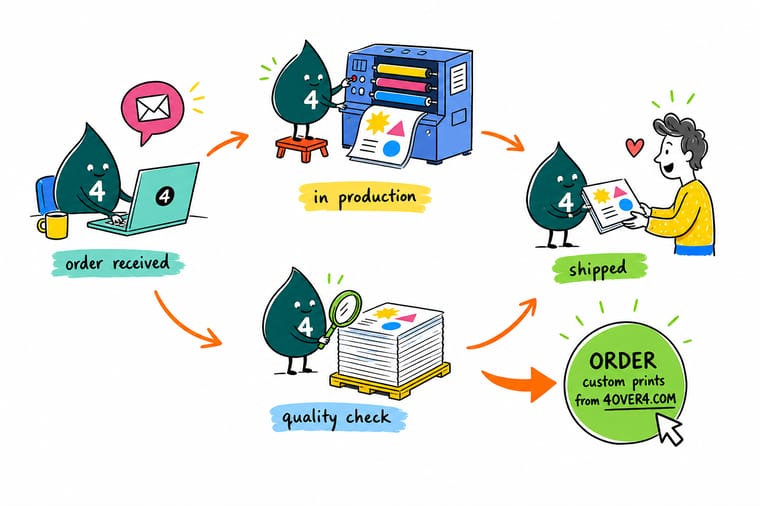
Wally starts the production clock when your file is approved, not when you pay. He counts business days on it, stops it when the box is packed, and hands the box to a carrier who starts a second clock he does not control. That is why your tracking number can exist for a whole afternoon before it moves, and why a rush order shipped on a slow service still arrives on a slow service. Approve quickly, ship deliberately.
Reorder standard business cards →Specs and pricing
Turnaround options on the products people reorder most
Sizes, stocks and turnaround choices come straight from the 4OVER4.COM configurator, so you can see which schedule you are committing to before you place the order.


Print it
Start the next order with the file already right
Explore more
Where to go next





By the numbers
A schedule you can plan around at 4OVER4
Common Questions
Your order tracking questions, answered
My turnaround has passed and the order has not shipped. Why?
Check the approval date rather than the order date. Production days are counted from the point your files clear prepress and any proof is approved, so an order placed Monday and approved Wednesday started on Wednesday. Then count business days only. Weekends and holidays are not production days, and an order approved after the daily cutoff starts on the following business day. Between those two rules, an order that looks three days late is often exactly on schedule.
Why has my tracking number not updated?
Because a tracking number is created when the box is labeled, not when it is collected. Carriers do their pickup runs late in the day and the first real scan often lands that evening or the next morning, so a number issued at noon can show nothing at all until the following day. If it is still frozen after a full business day of carrier activity, that is the point where it is worth raising.
My order arrived in two boxes with different tracking numbers. Is something missing?
Almost certainly not. Different products run on different equipment and finish at different times, so a mixed order of cards and postcards is often shipped in stages rather than held until the slowest item is done. Each box gets its own label and its own number. Compare the item list on each shipping notification against your order before assuming a shortfall.
Does paying for a faster turnaround make the delivery faster?
It makes the printing faster, which is only half the journey. Rush options compress the production stretch and do nothing to the transit stretch, so a rush job on a ground service crossing the country can arrive after a standard job going a few states over. If the deadline is what matters, upgrade the shipping service as well as the turnaround, or the money buys you an earlier ship date and nothing else.
What actually holds an order in prepress?
Four things account for most of it. Artwork below roughly 300 dpi at final size, which prints soft. No bleed, so a trim variation of a sixteenth of an inch leaves a white sliver at the edge. RGB color that has to be converted, which shifts saturated blues and oranges. And live text or unflattened transparency that reflows on a different system. Setting the file up correctly the first time is covered in our guide to creating print ready files, and starting from a sized layout in the blank template library removes the bleed problem entirely.
Where do I find the tracking number in the first place?
It arrives in the shipping confirmation email the moment the label is generated, and it is stored against the order in your account order history. If the email has not landed, check the address on the order and the spam folder before anything else, because a typo in the contact address is a far more common cause than a missing shipment.
Get Started
Ready to put the next job in the queue?
Upload a file that clears prepress on the first pass, pick the turnaround that matches your date, and watch the order move through every stage without a phone call.
Legal Disclaimer
Gold Standard guarantees apply to all standard orders placed through 4over4.com. Price match requires verifiable proof of a competitor's published price for an equivalent product with matching specifications and turnaround time. Satisfaction guarantee covers manufacturing defects and print quality issues. Contact support with order number and documentation. On-time delivery rate based on tracked orders 1999 to 2026. Individual results may vary based on shipping carrier performance.
