
How to Create Outlines in Illustrator Before You Send Files to Print


The menu path takes two seconds. The part that decides whether it worked is what you do before you press the shortcut and how you check afterwards.
Unlock and unhide every layer, press Cmd+A to select all, then Type > Create Outlines, which is Shift+Cmd+O on a Mac and Shift+Ctrl+O on Windows. Confirm it worked by opening Window > Document Info and setting the panel menu to Fonts, which should list nothing at all. Save the outlined version as a separate copy, because outlines cannot be turned back into editable text once the file is closed.
Quick answer
Select everything, convert, then check Document Info
Create Outlines turns live type into vector paths so the printer never needs your font file. Unlock all layers with Option+Cmd+2 and show all with Option+Cmd+3, select everything with Cmd+A or Option+Cmd+A across artboards, then run Type > Create Outlines. Verify with Window > Document Info set to Fonts, which must come back empty. The command does not reach type inside placed .ai or .eps links, the hidden overflow of an overset text box, or type inside a symbol or an envelope, so handle those separately.
The Exact Sequence, Including the Step Everyone Skips
Five moves, in this order. The third one is the one that gets skipped, and it is the reason a file that looked outlined arrives here with two live fonts in it.
One, finish the design. Outlining is the last thing you do, after the copy is approved and the layout is locked. Reopening an outlined file to change a phone number means rebuilding the text.
Two, save the live master. Cmd+S the editable version under its normal name. Everything after this point happens in a copy.
Three, unlock and unhide everything. Object, then Unlock All, or Option+Cmd+2. Object, then Show All, or Option+Cmd+3. A locked layer cannot be selected, and anything that cannot be selected will not be outlined. This is the whole reason a file passes your own eye check and still trips our preflight.
Four, select and convert. Cmd+A selects everything on the active artboard, Option+Cmd+A selects across every artboard in the document. Then Type, then Create Outlines, or Shift+Cmd+O on a Mac and Shift+Ctrl+O on Windows. The type keeps its position and its colour and becomes a group of compound paths.
Five, Save As a copy. File, then Save As, and add an outlined suffix to the filename. Upload that one. Keep the master where you can find it, because the next reprint will need it. If you are starting a new layout rather than fixing an old one, the correctly sized files in our blank template library already carry the trim, bleed and safe area for the product you are printing.
How to Prove No Live Type Is Left
Outlined type and live type look identical on screen. You cannot check this visually, and clicking around with the Type tool is not a check either, since it only tests the objects you happen to click. Use the panels that count everything.
| Check | Where it lives | What a clean file shows | What it misses |
|---|---|---|---|
| Document Info | Window > Document Info, panel menu set to Fonts | An empty list. | Nothing in the current document. This is the primary check. |
| Find Font | Type > Find Font | No fonts listed in the document column. | Also lets you substitute a font, which is useful when one refuses to outline. |
| Links panel | Window > Links | No placed .ai or .eps artwork, or every link embedded. | It will not tell you whether the linked file contains live type. |
| Outline view | View > Outline, or Cmd+Y | Letterforms drawn as paths rather than solid shapes. | A quick visual confirmation, not a count. Never rely on it alone. |
Document Info set to Fonts is the one that settles the argument. If it lists a font, that font is still live somewhere in the file, and our RIP will either need it or substitute something close, which is how a set typeface quietly becomes a system default between your screen and the press sheet. The wider preflight routine, including image resolution and colour mode, sits in our guide to creating commercial print ready files.
The Three Text Objects Create Outlines Leaves Behind

Create Outlines converts selected, visible, top level type. Three common cases fall outside that definition, and each one has caught a designer who did everything else right.
- Type inside a placed .ai or .eps link. A linked file is a window onto another document, and your Create Outlines command never reaches inside it. Open the linked file, outline it there, save it, and let the link update. Embedding the link instead does not convert the type either, it just moves the same live type into your file.
- Overset area type. A text box with a small red plus sign at the bottom right is hiding words that do not fit. Outlining converts only what is visible and throws the overflow away with no warning and no recovery. Grow the box or thread the text before you convert.
- Type inside a symbol instance or an envelope. Symbol instances and Envelope Distort objects hold their contents at arm’s length. Break the link to the symbol, or use Object, then Envelope Distort, then Expand, and the type becomes selectable and convertible.
One more that is not strictly a skip but behaves like one: type carrying an appearance, such as an added stroke, an offset path or a warp effect. Create Outlines converts the letterforms, then the live effect re-renders on top of the new paths and the result can shift. Run Object, then Expand Appearance first, then outline. Logos are the usual offender here, since a wordmark built from a font plus a stroke is common. Our step by step logo build in Illustrator shows how to construct one that outlines cleanly, and the common logo mistakes to avoid before printing covers the ones we see arrive broken.
When Not to Outline, and What It Costs You
Outlining is not free, and it is not always the right answer. Three real costs are worth weighing before you reach for the shortcut.
You lose the text. Not visually, but as text: nobody can fix a typo, search the file, or reuse the copy. On a job that reprints every quarter with a new date, outlining the whole layout means rebuilding it every quarter. Outline the logo and the display type, leave the rest live, and export a PDF that embeds the font.
You add weight. Each letterform becomes a compound path with anchor points on every curve. A postcard back full of outlined body copy at 8 point can carry tens of thousands of points, which makes the file slower to open, slower to transmit and slower to rip. For a business card it is irrelevant. For a large format layout with paragraphs of small print it is not.
You lose the hinting. Fonts carry instructions that tune how strokes land on a coarse pixel grid, and outlines have none, so very small outlined type can look slightly heavier on screen or on an office laser proof. It does not carry through to a commercial press, but it does cause the alarmed phone call about the proof.
The sensible default for most jobs: supply a press ready PDF with fonts embedded, and outline only the artwork where the font licence blocks embedding or the design depends on modified letterforms. When you do supply a native file, outline everything. Before either, check the colour mode with our CMYK and RGB conversion guide and the trim allowance in crop marks and bleed explained, because a perfectly outlined file still fails preflight if the art stops at the trim line. Type choice matters too, since fonts that stay easy to read in print tend to be the ones that survive being set small on standard business cards or across a run of flyers.
Wally explains outlines
Letters become shapes, and the font stops mattering
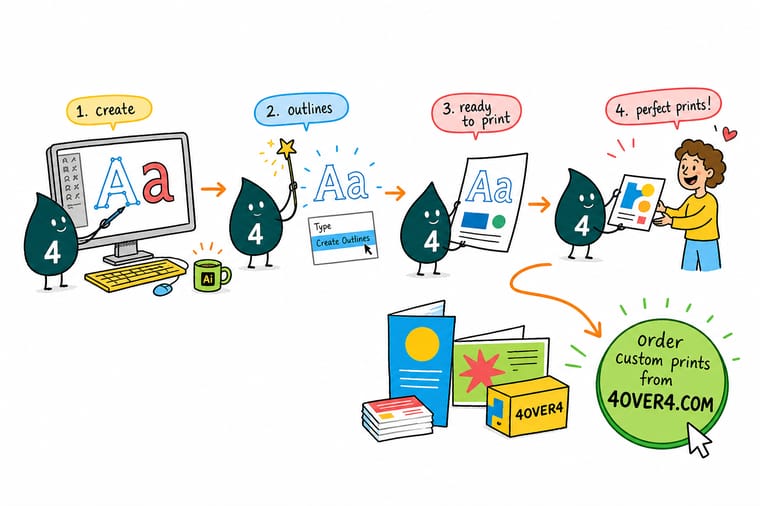
Live type is a set of instructions that says use this font at this size. If our press does not have that font, something else gets used and the layout moves. Outlining trades the instruction for the drawing: the letters become plain vector shapes, so what Wally prints is exactly what you drew. The catch is that shapes cannot be retyped, so keep your editable file and send the outlined copy.
Grab a blank template to start from →Specs and pricing
Sizes, stocks and starting prices for the jobs this file goes on
Once the artwork is outlined and saved, these are the configurations you upload it to, with live options and starting prices straight from the 4OVER4.COM configurator.


Print it
Send the outlined file and print it
Explore more
Where to go next



By the numbers
Files we take in and print every day
Common Questions
Your Create Outlines questions, answered
What is the keyboard shortcut for Create Outlines in Illustrator?
Shift+Cmd+O on a Mac, Shift+Ctrl+O on Windows. The menu path is Type, then Create Outlines. It applies to whatever is currently selected, so the usual sequence is Cmd+A to select all on the active artboard, or Option+Cmd+A to select across every artboard in the document, and then the shortcut. Nothing appears to happen except that the type loses its baseline and gains a bounding box full of anchor points, which is exactly what you want.
How do I check that no live fonts are left in the file?
Open Window, then Document Info, and set the panel menu to Fonts. A file with nothing left to outline shows an empty list. Type, then Find Font is the second check and it doubles as a repair tool, because it names every font still in use and lets you swap one. Do both before you upload. Selecting the artwork and looking at it proves nothing, since outlined and live type look identical on screen until you click into them with the Type tool.
Do I still need to create outlines if I export a print ready PDF?
Usually no. A PDF exported with Illustrator default print settings embeds the font subsets it needs, and an embedded subset prints the same way outlines do. Outline anyway in three cases: the font licence forbids embedding and the export drops it, the file is going to a partner whose workflow flattens or re-flows text, or you are supplying native .ai artwork rather than a PDF. Our walkthrough of the export settings is in the guide to exporting a print ready PDF from Illustrator or InDesign.
Why did some of my text vanish after I created outlines?
It was overset. Area type that does not fit its box shows a small red plus sign at the bottom right, and the hidden overflow is not part of the visible type object. Create Outlines converts what is visible and discards the rest permanently. Before outlining, click each text box and either enlarge it until the red plus disappears or use Type, then Threaded Text to flow the remainder into a second box.
Can I edit text after creating outlines?
Only until you close the file. Cmd+Z steps back while the undo history is alive, but once the document is closed and reopened the letters are shapes and nothing brings the words back. That is why the working habit matters more than the command: keep the live version as your master, then use File, then Save As to write a second copy with an outlined suffix and send that one. Fixing a typo later then costs a minute rather than a rebuild.
Does outlining change how the type prints?
The shapes are identical, but the rendering hints inside the font are gone, so outlined type at 6 or 7 point can look a shade heavier on a screen or a low resolution office proof. On a commercial press imaging at high resolution the difference does not survive to the sheet. The real cost is file weight: a page of outlined body copy carries thousands of anchor points, which makes the file slower to open and slower to rip than the same page with an embedded font.
Get Started
Artwork outlined and ready to go?
Upload the outlined copy, pick your stock and quantity, and our prepress team checks the file before anything goes on press.
Legal Disclaimer
Gold Standard guarantees apply to all standard orders placed through 4over4.com. Price match requires verifiable proof of a competitor's published price for an equivalent product with matching specifications and turnaround time. Satisfaction guarantee covers manufacturing defects and print quality issues. Contact support with order number and documentation. On-time delivery rate based on tracked orders 1999 to 2026. Individual results may vary based on shipping carrier performance.
